AJAX
Asynchronous JavaScript and XML (AJAX) is a technique in which a web page requests data from a server in the background and uses the response to update part of the page without a full reload.
Jesse James Garrett coined the name in a 2005 essay about a combination of existing browser technologies. The XMLHttpRequest object sent the request, XML carried the data, and JavaScript changed the DOM. The page stays responsive while it waits, which makes AJAX a common case of asynchronous programming.
The name stuck after the technologies behind it changed. Most AJAX code now exchanges JSON instead of XML and sends requests with fetch(), which returns a promise. Single-page applications rely on AJAX to update their content as needed. The technique is common enough that many developers no longer call it by name.
AJAX is a browser technique. Node.js provides fetch() too, but it has no page to update.
Example
Say a product page shows its first few reviews and a Load more button that should add the next batch without reloading. This block needs a page with a #reviews list, a #more button, and an /api/reviews endpoint, so it doesn’t run in Node.js:
const list = document.querySelector("#reviews");
const button = document.querySelector("#more");
let page = 1;

button.addEventListener("click", async () => {
  page += 1;
  const response = await fetch(`/api/reviews?page=${page}`);
  if (!response.ok) {
    return;
  }
  const reviews = await response.json();

  for (const review of reviews) {
    const item = document.createElement("li");
    item.textContent = review.text;
    list.append(item);
  }
});
Each click requests only the next page of reviews as JSON. While the request is in flight, the page keeps responding to input. When the data arrives, the handler appends new list items, and the rest of the page, including the scroll position, stays as it was. Here’s the full round trip:
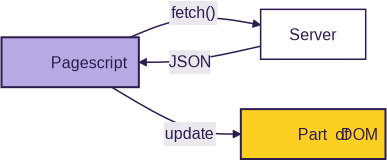
A fetch() promise doesn’t reject on an HTTP error status such as 404, so the handler checks response.ok before it reads the body.
Related Resources
Tutorial
JSON vs XML: Why JSON Won the Web and Where XML Still Fits
Weigh JSON vs XML by the shape of your data and see what each parser hands back in JavaScript, so you can pick the right one for your project.
Have a question about this? Mentor AI can show you examples, compare related terms, and point you to tutorials.
Ask Mentor AI

By Leodanis Pozo Ramos • Updated Nov. 24, 2026
