cross-site scripting (XSS)
Cross-site scripting (XSS) is a security vulnerability in which an attacker gets a website to run the attacker’s JavaScript as though it were part of the site’s own code.
The injected script runs with the page’s privileges. It can read and change the page, read data the site keeps in the browser, and send requests that carry the user’s credentials. XSS is a web platform problem, and the attack runs in the victim’s browser.
Every XSS hole needs two things. The site accepts input that an attacker can craft, such as a URL parameter or a comment, and it puts that input into a page without making it safe. The input turns into code when it reaches a sink that parses strings as markup or script, such as innerHTML or eval().
Reflected XSS happens when a server echoes a request parameter into the HTML it returns. DOM-based XSS happens when page script writes the input into the DOM. Stored XSS saves the payload, for example in a comment, so the server delivers it to every visitor. All three paths end with the browser parsing the input as HTML:
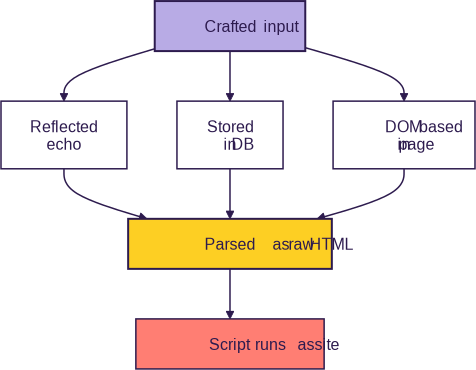
The main defenses are output encoding and sanitization. Encoding turns characters such as < and & into HTML entities, so the browser shows them as text. Sanitization strips unsafe elements and attributes from HTML. A Content Security Policy (CSP) adds a backup layer that blocks scripts the site didn’t approve.
Example
Say a comment widget builds its markup with a template literal and inserts the commenter’s name as typed:
> const renderAuthor = (name) => `<p class="author">${name}</p>`;
undefined

> renderAuthor("Ada")
'<p class="author">Ada</p>'
> renderAuthor('<img src="x" onerror="alert(document.cookie)">')
'<p class="author"><img src="x" onerror="alert(document.cookie)"></p>'
The template literal copies the name into the markup unchanged. Assigned to innerHTML, the second string would create a real <img> element, and its onerror handler would run the attacker’s code as soon as the broken image failed to load.
Encoding the name before it reaches the markup turns the same payload into plain text:
> const entities = { "&": "&", "<": "<", ">": ">", '"': """ };
undefined
> const escapeHtml = (text) =>
… text.replace(/[&<>"]/g, (char) => entities[char]);
undefined
> escapeHtml('<img src="x" onerror="alert(document.cookie)">')
'<img src="x" onerror="alert(document.cookie)">'
The browser displays the encoded string as the literal characters of the payload. No <img> element exists, so no handler runs.
Related Resources

Tutorial
Welcome to RealJS: Why Learning JavaScript Still Matters When AI Writes the Code
AI agents write more JavaScript every year, so is learning the language still worth it? Here's why we think it matters more than ever, and why we're building RealJS.
Have a question about this? Mentor AI can show you examples, compare related terms, and point you to tutorials.
Ask Mentor AI

By Leodanis Pozo Ramos • Updated Nov. 24, 2026
