pnpm
pnpm is a JavaScript package manager that downloads each version of a package once into a shared store on disk and links it into every project that depends on it. As a result, installs run faster and use less disk space than keeping a separate copy in every project:
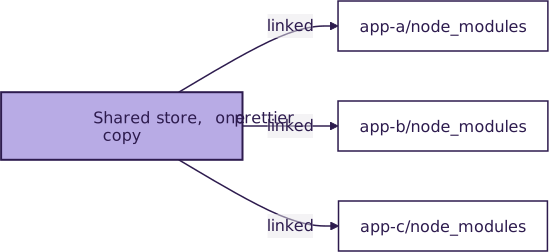
The name stands for “performant npm.” pnpm reads the same package.json files and installs from the same registry as npm, and it records exact versions in a pnpm-lock.yaml lockfile.
Installation and Setup
On macOS and Linux, the standalone script installs pnpm as a native executable that doesn’t need Node.js:
$ curl -fsSL https://get.pnpm.io/install.sh | sh -
On Windows, run this in PowerShell. pnpm’s docs recommend installing with npm there, because Windows Defender can block the standalone executable:
PS> npm install -g pnpm@latest
The npm route needs Node.js 18 or later. Next, confirm the installed version:
$ pnpm --version
12.16.1
Key Features
- Stores every package version once and links its files into each project’s
node_modulesfolder. - Places only a project’s direct dependencies at the top of
node_modules, so code can’t import undeclared packages by accident. - Refuses to run the build scripts of dependencies, such as
postinstall, unless the project allows them. - Manages monorepos through workspaces listed in a
pnpm-workspace.yamlfile.
Usage
Say a new project needs Prettier to format its code. After pnpm init creates a package.json, the add command with -D installs Prettier and saves it under devDependencies:
$ pnpm add -D prettier
devDependencies:
+ prettier 3.9.10

Done in 306ms using pnpm v12.16.1
A script in package.json gives the formatter a short name:
{
  "scripts": {
    "format": "prettier --write ."
  }
}
pnpm also runs a script given only its name, so pnpm format works as a shortcut for pnpm run format:
$ pnpm format
After cloning the project, a teammate installs every dependency at the versions in the lockfile:
$ pnpm install
The pnpm dlx command, or its short alias pnx, runs a package’s command once without adding it to the project:
$ pnpm dlx create-vite my-app
In a workspace, the --filter flag runs a command in selected projects only:
$ pnpm --filter web test
For every command and setting, see the pnpm documentation.
Have a question about this? Mentor AI can show you examples, compare related terms, and point you to tutorials.
Ask Mentor AI

By Leodanis Pozo Ramos • Updated Nov. 6, 2026
