prototype
A prototype is an object that another object falls back on for properties it doesn’t have itself, which lets many objects share one set of methods without each one holding a copy.
Every object has an internal link to its prototype, the [[Prototype]] internal slot in ECMA-262. The link points to another object or to null. When code reads a property that an object doesn’t own, JavaScript looks for it on the prototype, then on that object’s prototype, and so on. These links form the prototype chain. Assigning a property usually creates an own property on the object itself and leaves the prototype unchanged.
Constructor functions and classes carry a .prototype property, and new makes that object the prototype of each instance it creates. The instance methods of a class live on that object, which is why every instance shares them. The name trips people up, because a constructor’s .prototype property isn’t the constructor’s own prototype.
The Object methods Object.getPrototypeOf() and Object.create() read an object’s prototype and create an object with a chosen one.
Example
Say an accounting app creates one Invoice instance per billing period, and each invoice needs a method that adds tax:
> class Invoice {
…   constructor(amount) {
…     this.amount = amount;
…   }
…   withTax() {
…     return this.amount * 1.2;
…   }
… }
undefined
> const march = new Invoice(100);
undefined
> const april = new Invoice(250);
undefined

> april.withTax()
300
> Object.getPrototypeOf(april) === Invoice.prototype
true
> march.withTax === april.withTax
true
> Object.hasOwn(april, "withTax")
false
> april.prototype
undefined
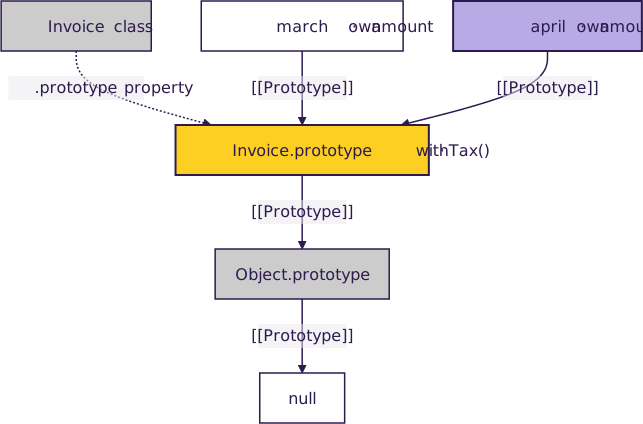
Each instance owns only its amount. The call to .withTax() finds the method on Invoice.prototype, so both invoices share one function. The instance itself has no .prototype property, because that property belongs to the constructor. Here’s the full chain for both invoices:
An object made with Object.create() follows its prototype link on every lookup, which a set of default user settings shows:
> const defaults = { currency: "USD", locale: "en-US" };
undefined
> const settings = Object.create(defaults);
undefined
> settings.locale = "de-DE";
'de-DE'

> settings
{ locale: 'de-DE' }
> settings.currency
'USD'

> defaults.currency = "EUR";
'EUR'
> settings.currency
'EUR'
Assigning settings.locale creates an own property that shadows the default. The currency lookup still goes through to defaults, so a later change there shows up on settings right away.
Have a question about this? Mentor AI can show you examples, compare related terms, and point you to tutorials.
Ask Mentor AI

By Leodanis Pozo Ramos • Updated Nov. 5, 2026
