WeakRef
The WeakRef global object holds a weak reference to an object or non-registered symbol, so the garbage collector can still reclaim that target while the WeakRef points at it. Its .deref() method returns the target while it’s alive:
> const settings = { theme: "dark" };
undefined
> const ref = new WeakRef(settings);
undefined

> ref.deref()
{ theme: 'dark' }
> ref.deref() === settings
true
Once nothing else holds a strong reference to the target and the engine reclaims it, .deref() returns undefined from then on. A WeakRef can’t be pointed at a new target. Code that reads one checks the result every time, since only strong references keep the target alive:
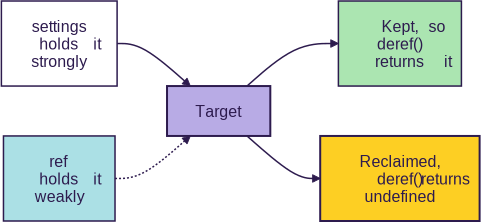
Each engine decides when, and whether, to collect a target. A target that was just wrapped in a WeakRef or returned by .deref() stays alive until the current job finishes, so it can’t disappear in the middle of synchronous code.
WeakRef was added in ES2021 and is Baseline Widely available. Non-registered Symbol values became valid targets in ES2023, and that support is Baseline Newly available since 2025.
Syntax
The WeakRef constructor takes the value to reference:
new WeakRef(<target>)
| Parameter | Description |
|---|---|
target |
The object or non-registered symbol to reference. It’s required, and any other value throws a TypeError |
The constructor returns a new WeakRef. The new keyword is required, and calling WeakRef() without it throws a TypeError.
Key Instance Methods and Properties
| Member | Kind | Description |
|---|---|---|
.deref() |
Instance method | Returns the target, or undefined once the garbage collector has reclaimed it (ES2021) |
Examples
A document viewer caches parsed files by name, but the cache shouldn’t keep a parsed file in memory after the viewer closes it. The cache stores a WeakRef to each result and parses again only when .deref() comes back empty:
> const cache = new Map();
undefined
> function getParsed(name, text) {
…   const cached = cache.get(name)?.deref();
…   if (cached !== undefined) {
…     return cached;
…   }
…   console.log(`Parsing ${name}`);
…   const parsed = JSON.parse(text);
…   cache.set(name, new WeakRef(parsed));
…   return parsed;
… }
undefined

> getParsed("config.json", '{"port": 8080}')
Parsing config.json
{ port: 8080 }
> getParsed("config.json", '{"port": 8080}')
{ port: 8080 }
The second call finds the live object and skips parsing. The Map itself still holds its keys and the WeakRef wrappers strongly. Only the parsed objects can be reclaimed.
An event hub notifies subscriber objects without keeping them alive. It stores a WeakRef per subscriber, delivers to the ones that still exist, and drops the rest:
> const subscribers = new Set();
undefined
> function publish(message) {
…   for (const ref of subscribers) {
…     const subscriber = ref.deref();
…     if (subscriber === undefined) {
…       subscribers.delete(ref);
…     } else {
…       subscriber.notify(message);
…     }
…   }
… }
undefined
> const panel = { notify: (message) => console.log(`Panel got ${message}`) };
undefined
> subscribers.add(new WeakRef(panel)).size
1

> publish("saved")
Panel got saved
undefined
When panel is no longer referenced anywhere else, a later publish() call finds an empty WeakRef and removes it from the set.
Common Gotchas
Only values that can be held weakly are valid targets. Primitives, such as strings and numbers, and symbols registered with Symbol.for() throw a TypeError:
> new WeakRef("config")
Uncaught TypeError: WeakRef: invalid target
    at new WeakRef (<anonymous>)
> new WeakRef(Symbol.for("app"))
Uncaught TypeError: WeakRef: invalid target
    at new WeakRef (<anonymous>)
A WeakRef gives no timing guarantee. Its target may be collected much later than expected or never, so .deref() returning an object doesn’t mean the program still uses it. Code that stores the result of .deref() in a long-lived variable holds a strong reference again, which keeps the target alive.
Related Resources

Course
JavaScript Map and Set for Pythonistas
Port a community garden's season report to JavaScript, and learn when to use a Map, a Set, or a plain object, and how to count, group, and compare without Counter or defaultdict.
Have a question about this? Mentor AI can show you examples, compare related terms, and point you to tutorials.
Ask Mentor AI

By Leodanis Pozo Ramos • Updated Nov. 12, 2026
