monorepo
A monorepo is a single version-controlled repository that holds several distinct projects, such as apps and the libraries they share, with defined relationships between them.
In JavaScript, each project in a monorepo is usually a package with its own package.json file. Package managers support this layout through workspaces. npm and Yarn read a workspaces field in the root package.json, and pnpm reads a pnpm-workspace.yaml file.
When one workspace depends on another, the package manager links the local folder instead of downloading a copy from the registry. Build systems such as Turborepo and Nx work with these workspaces. They run tasks across packages in dependency order and cache the results.
A repository that stores unrelated projects side by side, with no links between them, isn’t usually called a monorepo.
Example
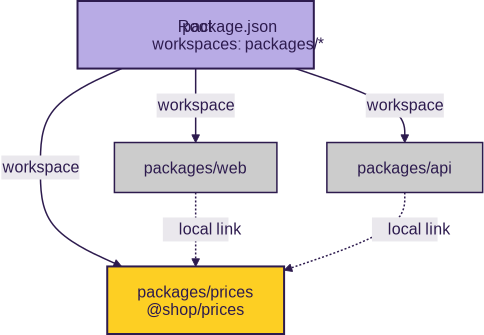
Say an online store keeps its web app, its API, and a shared price-formatting library in one repository. The root package.json marks every folder under packages/ as a workspace:
package.json
{
  "name": "shop",
  "private": true,
  "workspaces": ["packages/*"]
}
The package.json files in packages/web/ and packages/api/ both list "@shop/prices": "1.0.0" as a dependency. Running npm install at the root installs all three workspaces at once:
$ npm install
added 3 packages, and audited 7 packages in 399ms

found 0 vulnerabilities
Instead of fetching @shop/prices from the registry, npm creates a symbolic link at node_modules/@shop/prices that points to packages/prices/. A change to the shared library reaches both the web app and the API without a publish step in between. Here’s how the three workspaces connect:
Related Resources
Tutorial
Yarn vs npm vs pnpm: Who Runs Your Dependencies' Scripts
Yarn vs npm vs pnpm, compared on what matters now: which runs a dependency's install scripts, Yarn's split, and the one to pick.
Have a question about this? Mentor AI can show you examples, compare related terms, and point you to tutorials.
Ask Mentor AI

By Leodanis Pozo Ramos • Updated Nov. 23, 2026
