npm
npm is the default package manager for Node.js, made up of a public registry of JavaScript packages and the npm command-line tool that installs them into a project.
The npm project has three parts. Its registry is a public database of packages and their metadata. Developers search that registry and manage their accounts on the npmjs.com website. The npm command-line tool installs packages, publishes new ones, and runs project scripts. Node.js has bundled the npm command since 2011, so installing Node.js also installs npm.
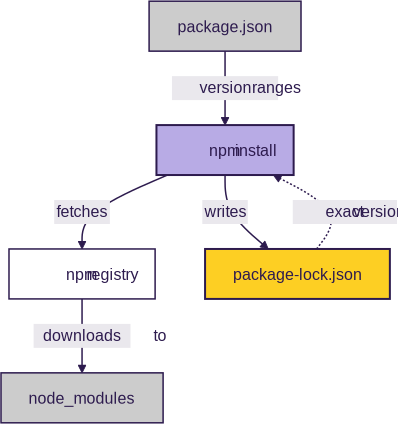
A project describes itself in a package.json file. It lists the project’s dependencies with the range of versions each one accepts. The npm install command downloads matching versions into a node_modules folder, where ES modules and CommonJS files can load them by name. It also writes a package-lock.json file that records the exact version of every package it installed, so later installs reproduce the same tree. Here’s how those files connect:
Other package managers, such as pnpm and Yarn, read the same package.json format and install from the same registry. The npx command, which ships with npm, runs a package’s command-line program without a global install.
Example
Say a price-tracking project needs the ms package to turn durations such as "2h" into milliseconds. Running npm install inside the project folder adds it:
$ npm install ms
added 1 package, and audited 2 packages in 507ms

found 0 vulnerabilities
The command adds the dependency to the dependencies field of package.json, shown here without the other fields that npm init created:
package.json
{
  "name": "price-tracker",
  "version": "1.0.0",
  "dependencies": {
    "ms": "^2.1.3"
  }
}
The caret in ^2.1.3 is npm’s default version range, and it accepts any later 2.x release. The package-lock.json file narrows that range to the exact version installed, so every later npm install of the project gets 2.1.3 until someone updates the dependency.
Related Resources
Tutorial
npm v12 and npm Supply Chain Attacks: What It Blocks
See how npm v12 blocks install scripts you haven't approved. Compare npm 11 vs 12 on Node 26, and learn which npm supply chain attacks still get through.
Have a question about this? Mentor AI can show you examples, compare related terms, and point you to tutorials.
Ask Mentor AI

By Leodanis Pozo Ramos • Updated Nov. 21, 2026
