Temporal
The Temporal global object is a namespace that groups the classes for working with dates, times, time zones, and durations, with nanosecond precision. It can’t be constructed and only holds static members. Each class models one kind of date or time value. No method changes a value in place, so arithmetic returns a new object:
> const due = Temporal.PlainDate.from("2026-01-31");
undefined

> due.add({ months: 1 }).toString()
'2026-02-28'
> due.toString()
'2026-01-31'
Temporal is designed as a replacement for the Date object. Like Math, it isn’t a constructor, so using it with new or calling it throws a TypeError.
Note: Temporal reached Stage 4 in March 2026 and is expected in ES2027. It ships in Chrome and Edge 144, Firefox 139, and Node.js 26, but stable Safari doesn’t support it yet, so it has Limited availability in Baseline terms.
Temporal Classes
Each class covers one level of detail, from an exact instant down to a month and day:
| Class | Represents |
|---|---|
Temporal.Instant |
An exact point in time, counted in nanoseconds since the epoch, with no time zone or calendar |
Temporal.ZonedDateTime |
A date and time in a named time zone, such as "America/New_York" |
Temporal.PlainDateTime |
A calendar date and wall-clock time with no time zone |
Temporal.PlainDate |
A calendar date, such as a birthday or a due date |
Temporal.PlainTime |
A wall-clock time with no date, such as an opening hour |
Temporal.PlainYearMonth |
A year and month, such as a billing period |
Temporal.PlainMonthDay |
A month and day that repeats every year, such as an anniversary |
Temporal.Duration |
A length of time, such as two hours and thirty minutes |
The “plain” classes carry no time zone, so they mean the same calendar values in every place. Each class parses and produces strings in the RFC 9557 format, an extension of ISO 8601, and converts down to the classes with less detail:
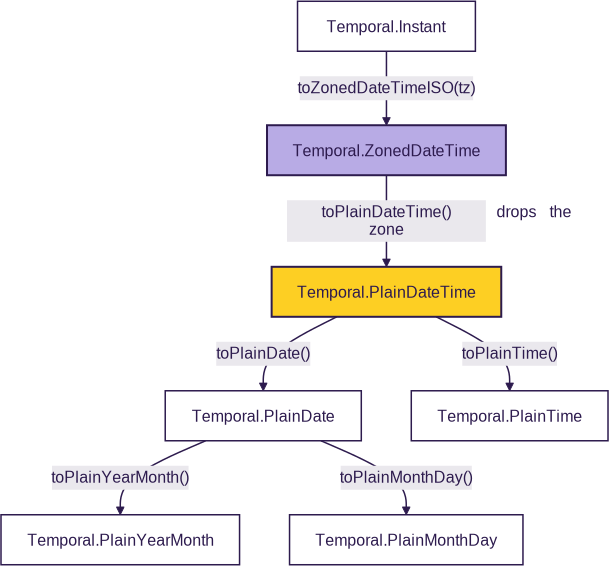
Key Static Methods and Properties
| Member | Kind | Description |
|---|---|---|
Temporal.Now |
Namespace | Holds the methods that read the current time |
Temporal.Now.instant() |
Static method | Returns the current time as a Temporal.Instant |
Temporal.Now.zonedDateTimeISO() |
Static method | Returns the current date and time in the host’s time zone or a given one |
Temporal.Now.plainDateISO() |
Static method | Returns today’s date in the host’s time zone or a given one |
Temporal.Now.timeZoneId() |
Static method | Returns the host’s time zone identifier |
Temporal.PlainDate.from() |
Static method | Creates a value from a string, an object of fields, or another value. Every class has its own .from() |
Temporal.PlainDate.compare() |
Static method | Returns -1, 0, or 1, so it works as a sort comparator. Every class except Temporal.PlainMonthDay has its own .compare() |
Key Instance Methods and Properties
Most classes share the same arithmetic and comparison methods. The links point to the Temporal.PlainDate versions:
| Member | Kind | Description |
|---|---|---|
.add(), .subtract() |
Instance method | Return a new value moved forward or back by a duration |
.until(), .since() |
Instance method | Return the Temporal.Duration between two values |
.with() |
Instance method | Returns a copy with some fields replaced, such as { day: 1 } |
.equals() |
Instance method | Returns true when two values hold the same date or time |
.year, .month, .day, .dayOfWeek |
Instance property | Return the date’s fields. Months start at 1, and .dayOfWeek runs from 1 for Monday to 7 for Sunday |
.toString() |
Instance method | Returns the value as an RFC 9557 string, such as "2026-03-15" |
.toLocaleString() |
Instance method | Returns a language-sensitive string formatted through Intl |
.withTimeZone() |
Instance method | Returns the same instant as a Temporal.ZonedDateTime in another time zone |
.total() |
Instance method | Returns a Temporal.Duration as a single number of a given unit, such as minutes |
Every member in these tables arrived with Temporal itself, so they share its Stage 4 status and support.
Examples
A team in New York holds a standup at 9:00 every morning. Adding one day to a Temporal.ZonedDateTime keeps the wall-clock time across the March daylight saving change, even though that day is only 23 hours long:
> const standup = Temporal.ZonedDateTime.from(
…   "2026-03-07T09:00[America/New_York]",
… );
undefined

> const next = standup.add({ days: 1 });
undefined

> next.toString()
'2026-03-08T09:00:00-04:00[America/New_York]'
> standup.until(next).toString()
'PT23H'
> standup.withTimeZone("Europe/Berlin").toString()
'2026-03-07T15:00:00+01:00[Europe/Berlin]'
Slide the standup’s start date across March 8 and switch between adding { days: 1 } and { hours: 24 } to see which one keeps the meeting at 9:00:
A project board counts down from kickoff to launch. The largestUnit option of .until() picks whether the result is in days or in months and days:
> const kickoff = Temporal.PlainDate.from("2026-09-01");
undefined
> const launch = Temporal.PlainDate.from("2026-11-20");
undefined

> kickoff.until(launch).toString()
'P80D'
> kickoff.until(launch, { largestUnit: "months" }).toString()
'P2M19D'
A timesheet adds up two work sessions. Adding durations balances the minutes into hours, and .total() converts the result into a single unit:
> const morning = Temporal.Duration.from({ hours: 1, minutes: 45 });
undefined
> const afternoon = Temporal.Duration.from({ hours: 2, minutes: 30 });
undefined

> const worked = morning.add(afternoon);
undefined

> worked.toString()
'PT4H15M'
> worked.total("minutes")
255
Common Gotchas
Comparison operators don’t work on Temporal values. Their .valueOf() throws a TypeError, so start < end throws instead of comparing dates, and === compares object identity. The .equals() method and the static .compare() method compare the values:
> const start = Temporal.PlainDate.from("2026-09-01");
undefined
> const end = Temporal.PlainDate.from("2026-11-20");
undefined

> start === Temporal.PlainDate.from("2026-09-01")
false
> start.equals(Temporal.PlainDate.from("2026-09-01"))
true
> [end, start].sort(Temporal.PlainDate.compare).map(String)
[ '2026-09-01', '2026-11-20' ]
A Temporal.ZonedDateTime string needs a bracketed time zone. Without one, .from() throws instead of guessing the host’s zone:
> Temporal.ZonedDateTime.from("2026-03-07T09:00")
Uncaught:
RangeError: Temporal error: Time zone annotation is required for parsing a zoned date time.
    at ZonedDateTime.from (<anonymous>)
The Node.js REPL and console.log() show a Temporal value as an empty-looking object, such as Temporal.PlainDate {}. Calling .toString() shows the value itself.
Related Resources

Course
JavaScript Dates and Times for Pythonistas
Port a physio clinic's Python reminder script to JavaScript, and learn to read older Date code, then use Temporal for time zones, durations, and formatting times for people.
For additional information on related topics, take a look at the following resources:
Have a question about this? Mentor AI can show you examples, compare related terms, and point you to tutorials.
Ask Mentor AI

By Leodanis Pozo Ramos • Updated Nov. 20, 2026
