cross-origin resource sharing (CORS)
Cross-origin resource sharing (CORS) is an HTTP-header protocol that lets a server tell browsers which other origins may read its responses, relaxing the same-origin policy that otherwise blocks those reads.
An origin is the scheme, host, and port of a URL, so https://shop.example and https://api.shop.example are different origins. When a page calls fetch() on another origin, the browser sends an Origin header and shares the response with the script only if it carries a matching Access-Control-Allow-Origin header.
Requests beyond what an HTML form can send, such as a PUT or a JSON Content-Type, first trigger a preflight. The browser sends an OPTIONS request with Access-Control-Request-Method and Access-Control-Request-Headers, and it sends the real request only if the server approves both. Here is that exchange:
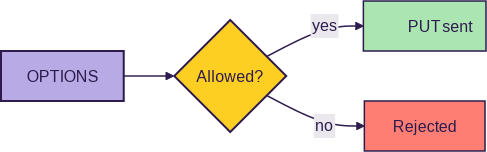
A blocked request rejects with a TypeError that hides the reason, so the details only show up in the browser’s console. CORS is defined by the WHATWG Fetch Standard and enforced by browsers. The Node.js fetch() doesn’t apply it, so a call that works in a server script can still fail on a web page.
Example
Say a storefront at https://shop.example saves a cart with a PUT request to an API server. This program runs a small API server and sends it the preflight a browser would send, then prints the reply:
cors-preflight.mjs
import { createServer } from "node:http";

const server = createServer((request, response) => {
  response.setHeader("Access-Control-Allow-Origin", "https://shop.example");
  if (request.method === "OPTIONS") {
    response.setHeader("Access-Control-Allow-Methods", "GET, PUT");
    response.setHeader("Access-Control-Allow-Headers", "Content-Type");
    response.statusCode = 204;
  }
  response.end();
});

server.listen(0);
const { port } = server.address();

const reply = await fetch(`http://localhost:${port}/cart`, {
  method: "OPTIONS",
  headers: {
    Origin: "https://shop.example",
    "Access-Control-Request-Method": "PUT",
    "Access-Control-Request-Headers": "content-type",
  },
});

console.log(`Status: ${reply.status}`);
console.log(`Origin: ${reply.headers.get("access-control-allow-origin")}`);
console.log(`Methods: ${reply.headers.get("access-control-allow-methods")}`);
server.close();
Running the file shows the headers a browser checks before sending the PUT:
$ node cors-preflight.mjs
Status: 204
Origin: https://shop.example
Methods: GET, PUT
The server names the storefront’s origin and allows PUT, so a browser would go on to send the real request. If the allowed origin were different, the browser would stop there, and the storefront’s fetch() call would reject without ever reaching the server’s PUT handler.
Have a question about this? Mentor AI can show you examples, compare related terms, and point you to tutorials.
Ask Mentor AI

By Leodanis Pozo Ramos • Updated Nov. 24, 2026
