
Over the last few lessons, events.css has gained a base, cards, a banner, fitted photos, and a type scale. You added each rule at the bottom of the file when you needed it. The page looks the way Rosa wants, but the file is in the order you happened to write it, so every change starts with a search.
In this lesson, you’ll sort the stylesheet into sections by purpose, turn the values that repeat into scales of custom properties, and keep selectors short. When you’re done, the page won’t have changed at all, and that’s how you’ll know the work is right. Start by finding everything that styles one heading.
Sort the Rules by Purpose
A stylesheet is quick to change when you can guess where a rule lives. Open upcoming.html, select the banner’s <h1>, Upcoming Events, in the Elements panel, and look at the Styles pane:
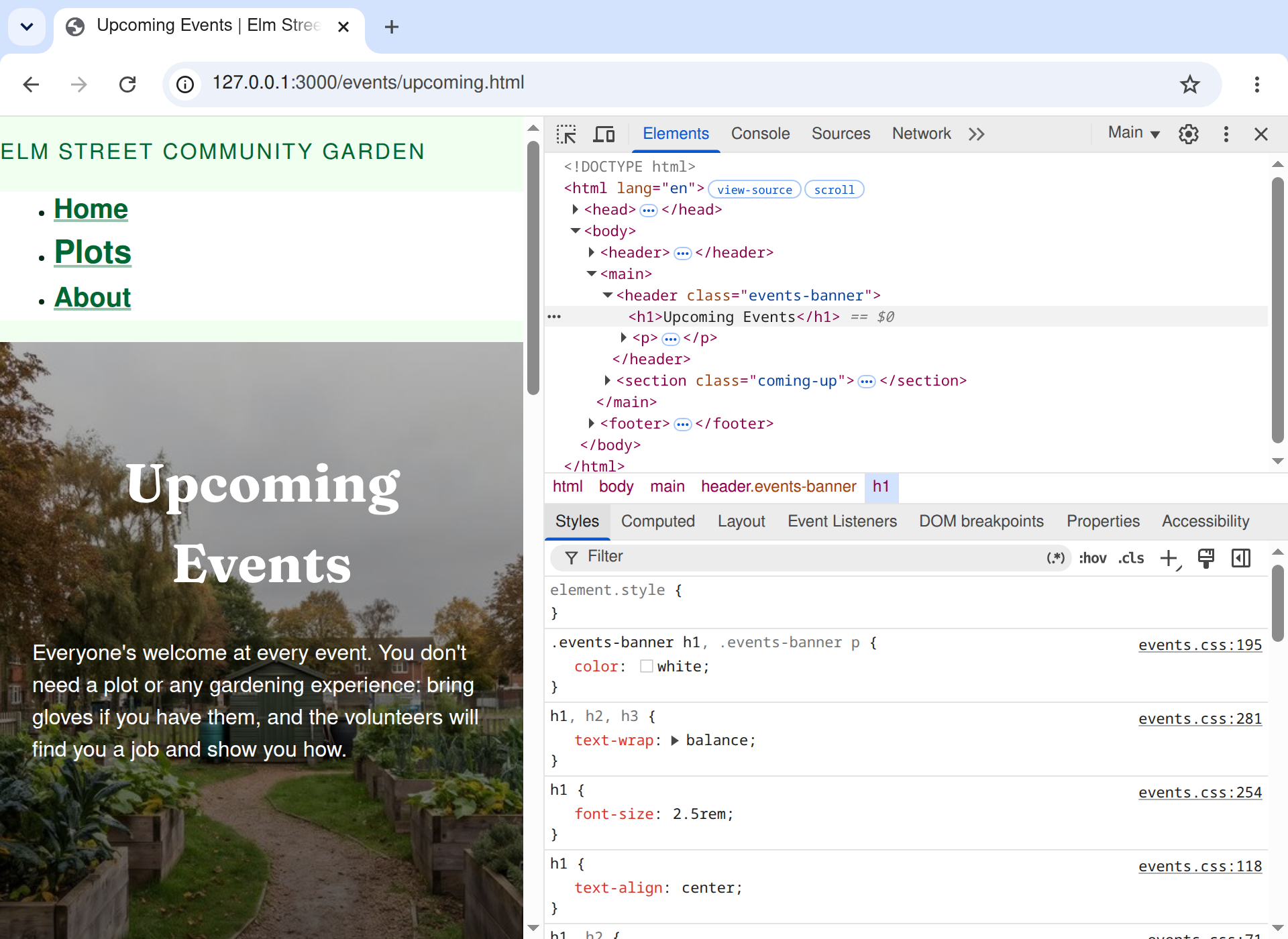
The link on the right of each rule, such as events.css:254, says where it sits in the file. Scroll down the pane, and you’ll count six rules from events.css for this one heading, at lines 195, 281, 254, 118, 71, and 42. Three of them use the same h1 selector. To change the heading with confidence, you’d have to read the whole file first.
In a program, you’d fix this by grouping code by purpose: setup first, shared constants next, then general code before specific code. A stylesheet can follow the same plan. A common order, from general to specific, has five sections:
- Base: Rules that undo the browser’s defaults, such as
box-sizingfor every element and the body’s margin - Tokens: The custom properties on
:rootthat the rest of the file reads - Elements: How each type of element looks wherever it appears, with element selectors such as
h1,p, anda - Components: One group of rules per part of the page, such as the navigation, the banner, and the event cards, selected by their classes
- Utilities: Small classes that do one job anywhere on the page, such as
.visually-hidden
The two body rules end up in different sections on purpose. The one with margin: 0 undoes a browser default, so it belongs in the base. The one with the colors and fonts is the page’s design, so it goes with the elements. The @font-face rule opens the elements section, ahead of the rules that use Fraunces.
Moving lines around in a program can change what it does. Does moving rules change the page? Mostly, it doesn’t. CSS is declarative: every rule that matches an element competes, and specificity decides before position does. Source order only breaks a tie between rules of equal specificity that set the same property on the same element.
The file has three ties like that, and the sorted version preserves the order of the tied rules. Two are in the link rules. A visited link under the pointer matches both a:visited and a:hover, so a:hover must stay after a:visited for the link to turn brown. A link you’re pressing matches a:hover too, so a:active must come after both for the pressed link to use var(--text).
The third tie is on the work day page: a job with class="job family-friendly" gets a color from both classes, so .family-friendly must stay after .job.
To check your own reasoning about ties, the mentor can give you pairs of rules to judge:

