
In the last lesson, you sorted events.css into sections, from the base down to the utilities, and labeled each one with a comment. The browser ignores comments, though, so they don’t change which rule wins. When two of your rules compete, the browser compares specificity first, and order only breaks a tie. So a general rule for every link can beat a component’s rule, regardless of which section each rule sits in.
In this lesson, you’ll turn the sections into layers that the cascade itself ranks, in an order you write down once. You’ll predict which rule wins when two layers disagree, check it in the Styles pane, and keep every rule inside a layer so the order holds. Start with a rule from the elements section that already beats a component.
Put the Sections in Layers
Your sections say that components refine how elements look in general, but nothing makes the browser follow that plan. Hover over the Needs water badge on the work day card. Its text turns brown, although the badge’s rule sets color: var(--text), the page’s dark text color.
Select the badge in the Elements panel, click :hov in the Styles pane, and tick :hover, as you’ve done for link states before. Here’s the Styles pane with the badge under the pointer:
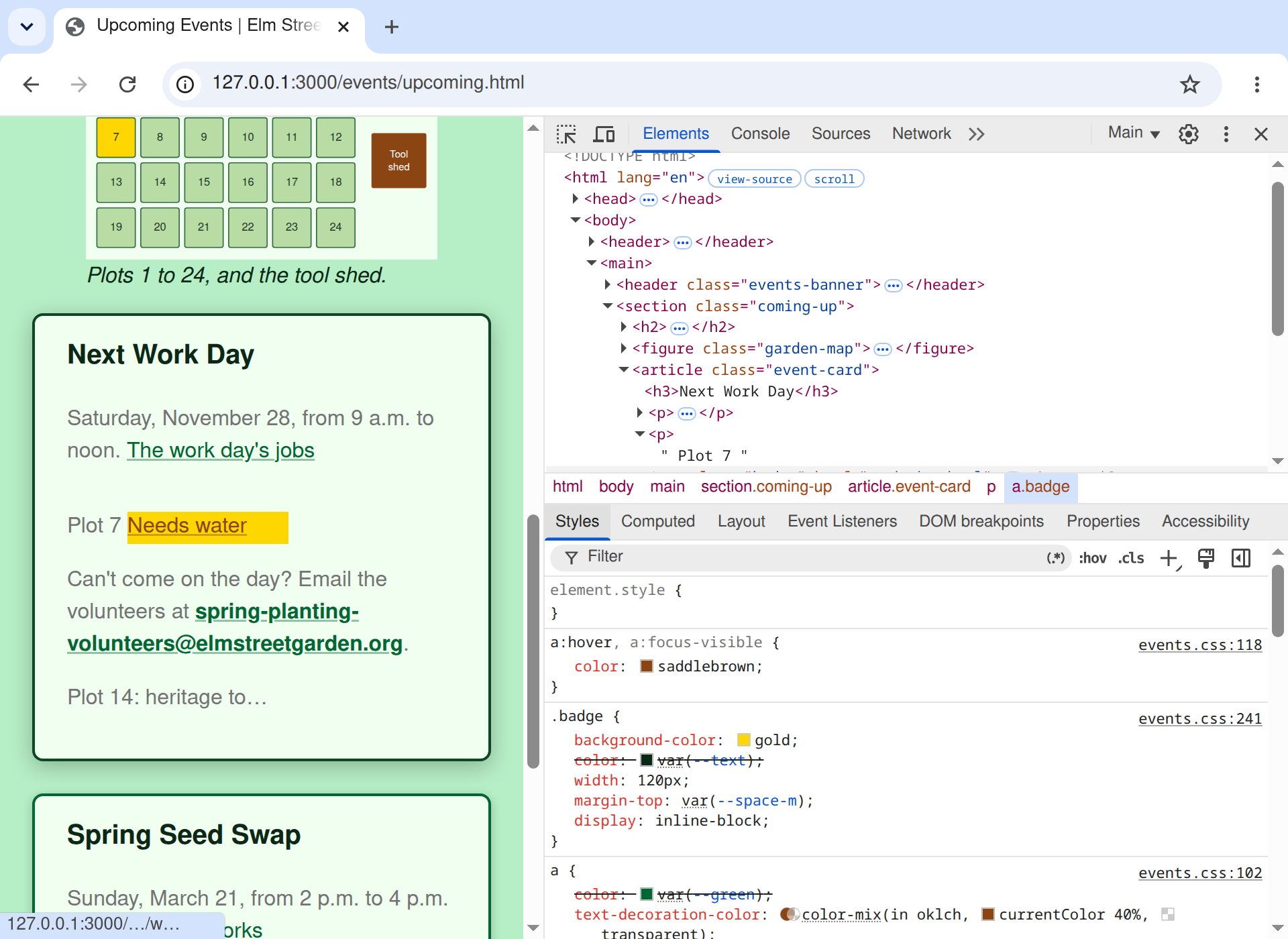
The a:hover, a:focus-visible rule from the elements section is listed above .badge, and its saddlebrown wins. In the .badge rule, the color is crossed out. a:hover wins on specificity. It scores (0, 1, 1), one pseudo-class and one type selector, while .badge scores (0, 1, 0).
You could make the badge’s selector more specific, as you did to settle conflicts with the cascade. That fixes this one conflict until the next general rule gets more specific. Instead, you can tell the browser the order of your sections. A cascade layer is a named group of rules, and the cascade compares layers before it compares specificity.
You name the layers in an @layer statement, earliest first, and every rule in a later layer beats every rule in an earlier one. MDN’s page marks it Baseline Widely available, so every current browser supports layers. At the top of events.css, below the first comment, add the statement:
events/events.css
@layer reset, tokens, base, components;
These four names are common in layered stylesheets, and they map onto your sections with two changes of name:
resetholds the section you called Base: the rules that undo the browser’s defaults.tokensholds the custom properties on:root.baseholds the elements section: the look of each type of element, which the components build on.componentsholds the components, with.visually-hiddenmoved to its end.
Watch the name base. From now on, it means the element styles, and the rules you called Base go in reset. The utilities section has a single rule, so it doesn’t need a layer of its own yet. Moved to the end of components, that rule still comes after every component rule. A bigger stylesheet would add a utilities layer after components.

