
The Family-friendly badge now sits on top of its card, and in the last lesson, a fixed box sat on top of the whole page. Whenever two boxes overlap like that, the browser has to decide which one is in front, and it doesn’t always decide the way you expect.
In this lesson, you’ll add a pop-up to the events page, see which box the browser puts in front when you don’t specify an order, and change the order with z-index. You’ll also find out why a z-index of 9999 can lose to a 2, so you can predict what covers what on any page. Start with the order the browser uses on its own.
See What the Browser Paints on Top
To see the browser’s order, you need two boxes that overlap. Rosa wants every visitor to the events page to know that plot 12 is free this season, so she asks for a pop-up at the top of the window. Add it as the first child of <main> in events/upcoming.html:
<main>
  <p class="plot-popup">
    Plot 12 is free this season. Ask Rosa!
  </p>
  <div class="events-banner">
Then give the pop-up its rule at the end of events/layout.css:
.plot-popup {
  position: fixed;
  top: 0;
  margin: 0;
  padding: var(--space-s) var(--space-m);
  border: 2px solid var(--green);
  background-color: white;
  font-weight: bold;
}
As in the last lesson, position: fixed places the pop-up against the window, and top: 0 holds it at the window’s top edge. With no left or right, it stays in the horizontal position it would have occupied in the flow, in line with the content of <main>. Save and look at the top of the page:
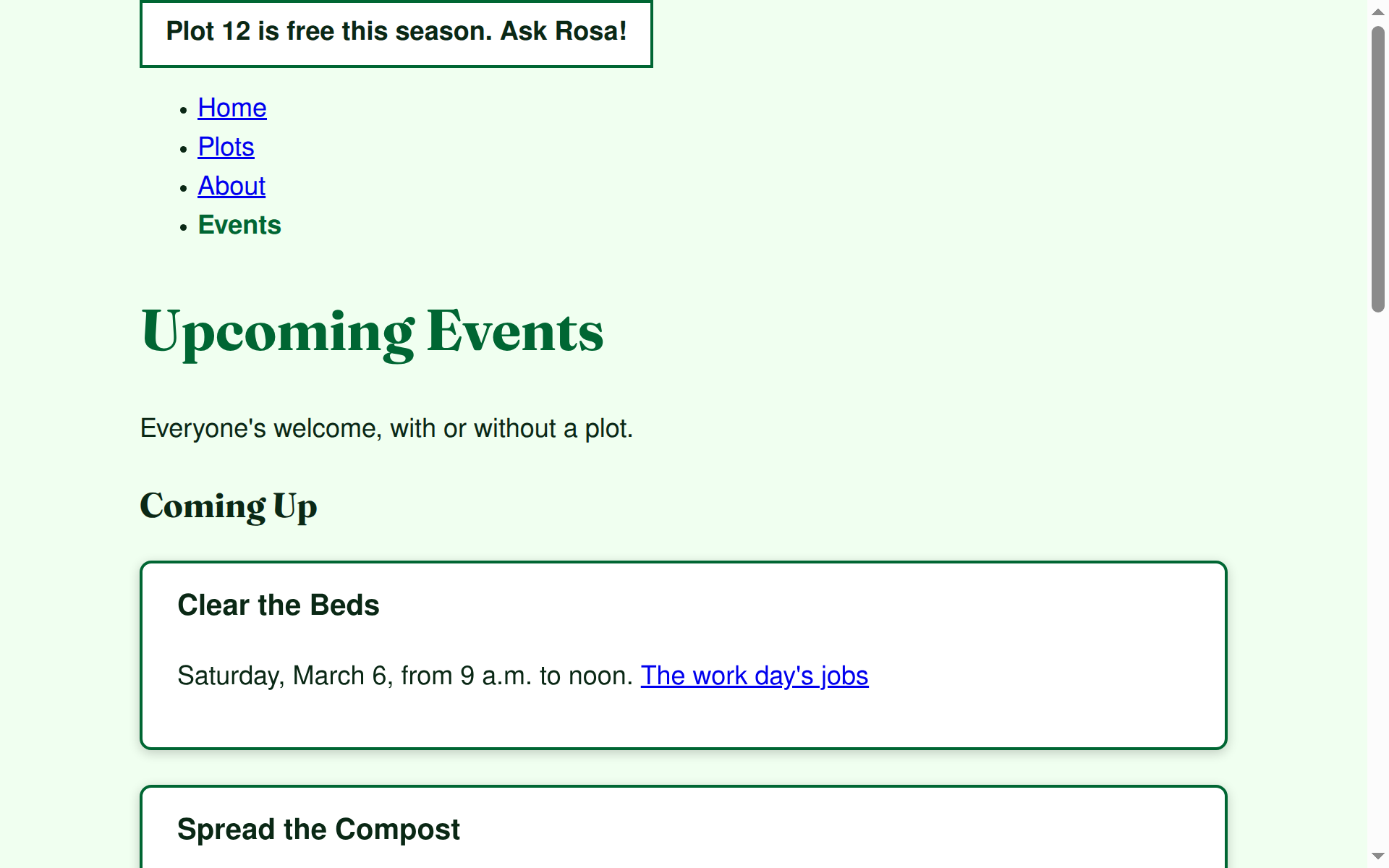
The pop-up covers the garden’s name. The header is in the normal flow, and the browser paints the boxes in the flow first, then the positioned boxes over them. Among positioned boxes with nothing else set, the browser paints the one that comes later in the HTML last, so it ends up in front.
This pop-up is a toy for seeing layers. A real one would need a button to close it, which takes more than CSS, so you’ll remove it at the end of the lesson.
Number the Layers With z-index
HTML order is a fragile way to decide what’s in front, so CSS lets you set the order with a number. Rosa now wants the header in front of the page’s content, so the garden’s name and the nav are never hidden. The pop-up is the one exception, and it should be in front of everything.
The z-index property takes an integer, and a box with a higher number is painted in front of a box with a lower one. It works on positioned boxes, so a box needs a position other than static before its z-index counts.
Watch out, though: z-index isn’t one page-wide ranking where the highest number always wins. A positioned box with a z-index other than the default, auto, creates a stacking context: a group whose contents are stacked among themselves, then painted together at that box’s own level. The whole page is a stacking context too, the one the header and <main> sit in.
On the events page, a natural plan is to number the layers: the header at 2, <main> at 1 below it, and the pop-up at 9999, above anything anyone adds later. Add the header and <main> rules at the end of layout.css, and a z-index to the pop-up:
header {
  position: relative;
  z-index: 2;
  background-color: var(--page);
}

main {
  position: relative;
  z-index: 1;
}

.plot-popup {
  position: fixed;
  top: 0;
  z-index: 9999;
  /* ... */
}
The header and <main> get position: relative so their z-index counts. As you saw with the cards, relative without insets doesn’t move them. The header’s background color is the page’s own, so where the header is in front, it hides whatever is behind it.
Save, and the header is in front of the pop-up. Only the pop-up’s top strip shows, above the header’s box:
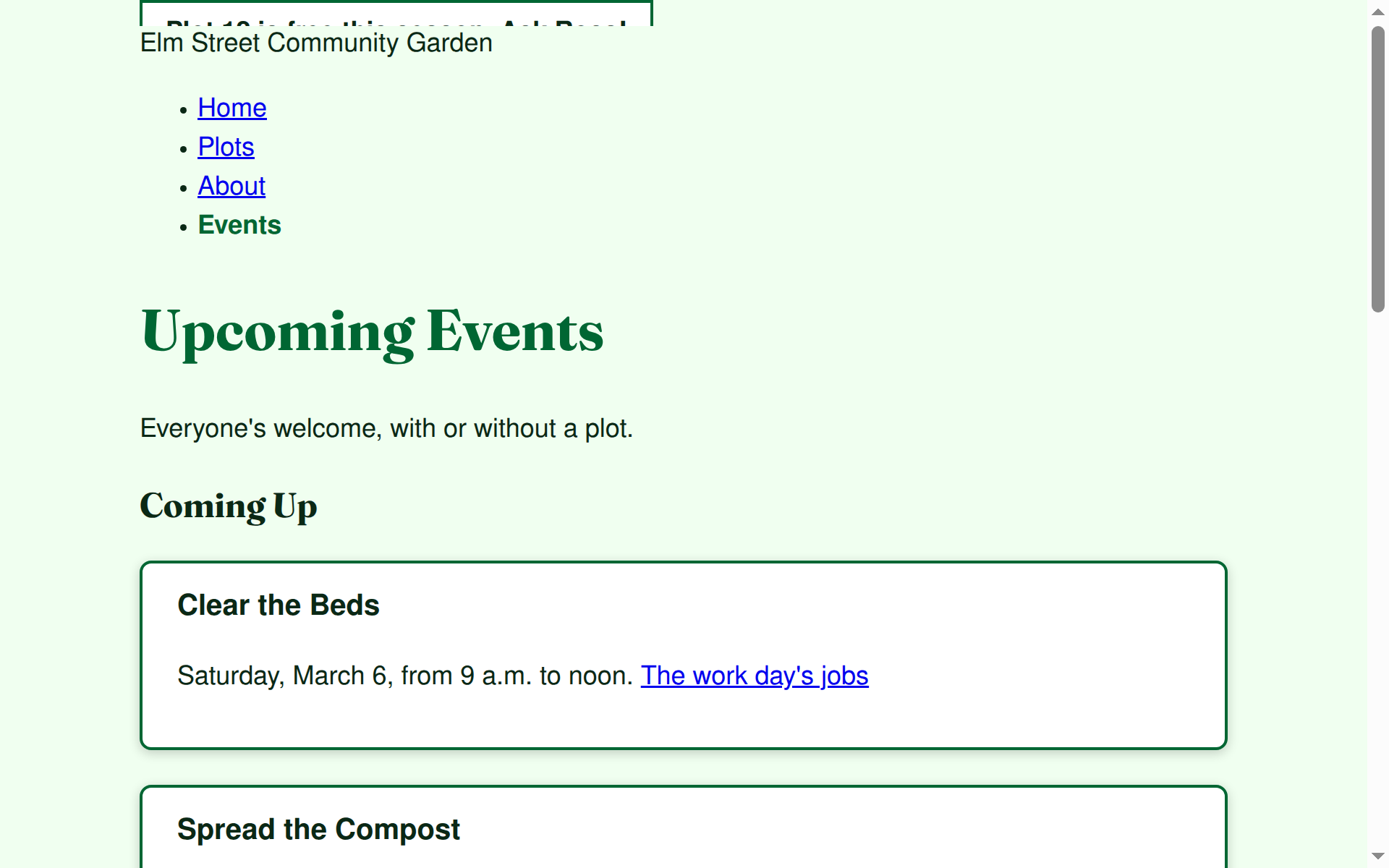
The 9999 lost to a 2, and the stacking context explains why.
Keep a Layer Inside Its Group
A high number only helps inside the group it belongs to. The z-index: 1 on <main> made it a stacking context, so the pop-up’s 9999 ranks it only among the boxes inside <main>, where it’s in front of the banner and the cards. Then the browser paints <main> and everything in it as one layer at level 1, under the header at level 2. Here’s how the groups nest:
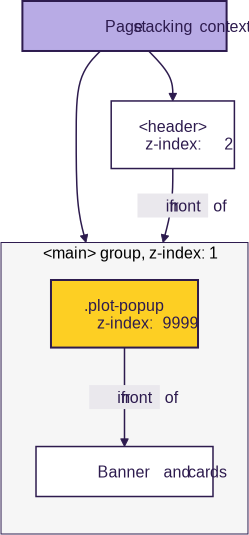
If you’ve read a numbered document, you know this order: section 1.9999 still comes before section 2, because the 1 is compared first. The analogy stops there, though. The browser never builds such numbers. A relative or absolute box with no z-index doesn’t start a group of its own. Fixed and sticky boxes always start one, with or without a z-index.
So when a high z-index won’t bring a box forward, don’t raise the number. Look at its ancestors in DevTools for a positioned one with a z-index other than auto, or a fixed or sticky one. That ancestor’s group is the one holding the box. A few other properties create groups too, but that’s all you need to know about them for now.
Raising 9999 can’t help here, since the pop-up can’t leave the group that <main> starts. Remove the group instead by deleting the main rule from layout.css. Save, and the pop-up is back in front of the header, as in the first screenshot. Its 9999 is now compared with the header’s 2 in the page’s stacking context. Moving the pop-up out of <main> would work too.
The cards follow the same rule. Each card has position: relative but no z-index, so it doesn’t make a group. If the Plant the Potatoes badge overlapped the header, a z-index: 10 on the badge would be compared with the header’s 2 in the page’s stacking context, and the badge would be in front.
If stacking contexts still feel slippery, the button below opens a chat with the mentor, with the question ready to send:
The pop-up has done its job, so delete its paragraph from upcoming.html and its rule from layout.css. Keep the header’s rule, since its 2 still puts the header in front of the cards and the badge, which have no z-index. Here’s the end of layout.css, after the commented-out row and the badge:
.event-card {
  position: relative;
}

header {
  position: relative;
  z-index: 2;
  background-color: var(--page);
}
Predict What Covers What
To predict which box is in front, find the stacking context each box belongs to, compare z-index values only within the same one, and fall back on HTML order when they tie. Answer both questions before you open the answers:
- The pop-up and the
main { position: relative; z-index: 1; }rule are back, and you change the header’sz-indexfrom 2 to 1. Which is in front where they overlap, the header or the pop-up? - In a sentence or two, explain why the pop-up’s 9999 lost to the header’s 2.
- The pop-up. The header and
<main>now tie at 1 in the page’s stacking context, so HTML order decides.<main>comes later, so it’s painted in front, with the pop-up inside it. - The
z-index: 1on<main>made it a stacking context, so the pop-up’s 9999 only counted inside<main>. The whole group was painted at level 1, behind the header at level 2.
For more practice predicting which box ends up in front, the button below starts a short quiz:
The header now stays in front of the page’s content. In the next lesson, Keep the Header in View, you’ll make it stay in view as well, while the page scrolls under it.
