
In Run Code Later Without Freezing, Sam’s egg timer handed a callback to setTimeout(), and the callback ran two seconds later while the page stayed usable. That left a question open. How does the callback still know which pan it’s for? It’s the browser that calls it, long after the line that started the timer has run.
Answering that takes a precise rule for where JavaScript finds a name.
In this lesson, you’ll follow that rule through functions written inside other functions. You’ll be able to point at any name in nested code and say which declaration it reaches or whether looking it up raises a ReferenceError. Start with the walk you already know, then take it one box deeper.
Walk Outward Through Nested Boxes
Before you put timers on Sam’s recipe steps, you need to know which variables a piece of code can reach. Earlier, you drew scopes as boxes. A function, like the ones you wrote in Functions in JavaScript, makes a box for its parameters and the names declared inside it, and a block such as a loop’s body makes one too. main.js is a box of its own, because every module has its own scope.
When a line reads a name, JavaScript looks in that line’s own box first, then walks outward until it finds the name. The outermost box is the page’s global scope, which holds the browser’s own names, such as document, console, and setTimeout. Those names are properties of the page’s global object, which you can reach through globalThis.
Open a new tab, go to about:blank, and open the Console with Ctrl+Shift+J or Cmd+Option+J on macOS. Compare the two ways of reaching the browser’s timer function:
> globalThis.setTimeout === setTimeout
true
Both reach the same function, because globalThis gives you the browser’s names as properties of one object. When a walk reaches the page, those are the names it finds there.
A function can also be written inside another function, and then its box sits inside that function’s box. Sam’s page will soon list each timed step of a recipe. Here’s a first version, with each step’s line built by an arrow function, announce, written inside listTimedSteps(). unit lives at the top level, so every function formats times the same way. Type the entries and call the function with Grandma Ines’s lentil soup and its two timed steps:
> const unit = "min";
undefined
> function listTimedSteps(recipe) {
…   const dish = recipe.name;
…   const announce = (step) => {
…     console.log(`${dish}: ${step.text}, ${step.minutes} ${unit}`);
…   };
…   for (const step of recipe.steps) {
…     announce(step);
…   }
… }
undefined
> listTimedSteps({
…   name: "Grandma Ines's lentil soup",
…   steps: [
…     { text: "Soften the onions", minutes: 8 },
…     { text: "Simmer", minutes: 25 },
…   ],
… })
Grandma Ines's lentil soup: Soften the onions, 8 min
Grandma Ines's lentil soup: Simmer, 25 min
undefined
JavaScript finds every name in the console.log() line inside announce, some in the line’s own box and some further out. Follow the walk for each name from that line:
stepis a parameter ofannounce, so the walk stops in the line’s own box.dishisn’t in the box ofannounce. One step out is the box oflistTimedSteps(), which declares it.unitis in neither function. The walk leaves both and finds it at the top level. In the Console, the top level is the page’s global scope, and your own declarations there are checked first.consoleis declared nowhere in your code. The walk goes on to the browser’s names in that same global scope, the properties ofglobalThis, and finds it there.
In main.js, there’s one more box on the way: the module’s own box sits between your functions and the page’s global scope.
The walk only goes outward, never inward. Type dish at the top level after the call:
> dish
Uncaught ReferenceError: dish is not defined
The top-level box does contain the box of listTimedSteps(), but a walk only checks the box it starts in and the boxes around that one, never the boxes nested inside. Only lines written inside listTimedSteps() can reach dish.
Same Name, Several Boxes
A recipe and its steps both have durations in minutes, so the same name is tempting at more than one level. That’s allowed, and the walk tells you which one each line reaches. Reload the tab, so the Console forgets the names from the last example, and print the soup’s step times with a small format helper:
> function printTimes(recipe) {
…   const minutes = recipe.minutes;
…   const format = (minutes) => `${minutes} min`;
…   for (const step of recipe.steps) {
…     const minutes = step.minutes;
…     console.log(`${step.text}: ${format(minutes)}`);
…   }
…   console.log(`Whole recipe: ${format(minutes)}`);
… }
undefined
> printTimes({
…   name: "Grandma Ines's lentil soup",
…   minutes: 45,
…   steps: [
…     { text: "Soften the onions", minutes: 8 },
…     { text: "Simmer", minutes: 25 },
…   ],
… })
Soften the onions: 8 min
Simmer: 25 min
Whole recipe: 45 min
undefined
Three variables here are called minutes. One belongs to the function, one to the loop body, and the third is the parameter of format. The walk stops at the first box that has the name. Inside the loop, format(minutes) reaches the loop body’s minutes, so each step shows its own time. Inside format, the template literal reaches the parameter, whatever value the caller passed.
Hiding an outer variable with an inner declaration of the same name is called shadowing. The outer variable still exists, unchanged. The last line, below the loop, is outside the loop body’s box, so its walk reaches the function’s minutes, still 45. Each const minutes creates a separate variable.
The cost of shadowing is that the outer variable is out of reach. Inside the loop, there’s no way to read the recipe’s 45 through the name minutes. When a line needs both the recipe’s minutes and the step’s minutes, give the variables different names, such as stepMinutes.
Look Where the Code Is Written
announce from the first section formats a step well, and Sam will want the same line elsewhere on the page. A reasonable move is to take it out of listTimedSteps() and put it at the top level, where any function can call it. Reload the tab and try that. Keep the call inside the loop, so announce is still called from inside listTimedSteps(), right where dish is declared. Run the entries and list the banana bread’s one timed step:
> const unit = "min";
undefined
> const announce = (step) => {
…   console.log(`${dish}: ${step.text}, ${step.minutes} ${unit}`);
… };
undefined
> function listTimedSteps(recipe) {
…   const dish = recipe.name;
…   for (const step of recipe.steps) {
…     announce(step);
…   }
… }
undefined
> listTimedSteps({
…   name: "Banana bread",
…   steps: [{ text: "Bake", minutes: 55 }],
… })
Uncaught ReferenceError: dish is not defined
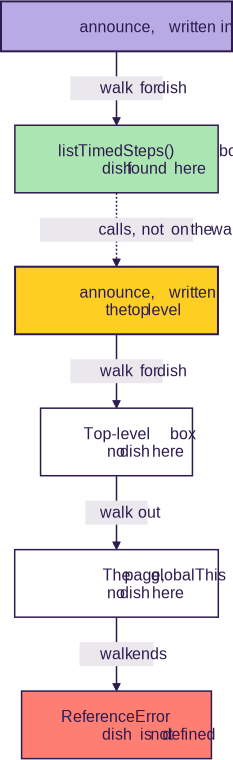
The move made sense, but calling announce from inside listTimedSteps() didn’t help. The walk for dish starts in the box of announce, and that box now sits directly inside the top-level box. The walk goes from announce to the top level, then on to the browser’s names on globalThis, but doesn’t find dish. The box of listTimedSteps() isn’t on that path, even though the call happens inside it.
Where a function is written decides which boxes surround it, and the walk follows those boxes. Where it’s called from doesn’t matter. Because the boxes come from the text of the code, this is called lexical scope, and the path of boxes a walk follows is the scope chain. Here are both walks from announce, first written inside listTimedSteps() and then at the top level:
To keep announce at the top level, hand it the dish through a parameter, the same way you passed values into helpers before:
> const unit = "min";
undefined
> const announce = (dish, step) => {
…   console.log(`${dish}: ${step.text}, ${step.minutes} ${unit}`);
… };
undefined
> function listTimedSteps(recipe) {
…   const dish = recipe.name;
…   for (const step of recipe.steps) {
…     announce(dish, step);
…   }
… }
undefined
> listTimedSteps({
…   name: "Banana bread",
…   steps: [{ text: "Bake", minutes: 55 }],
… })
Banana bread: Bake, 55 min
undefined
Now dish is a parameter of announce, so the walk finds it in that function’s own box. The other fix is to write announce back inside listTimedSteps(), as in the first section. If the difference between “called inside” and “written inside” still feels slippery, the button below opens a mentor chat with this question filled in:
The same rule answers the egg timer’s question from the start of this lesson. A callback you hand to setTimeout() is called by the browser, from outside all your functions. Its walk still starts where it’s written. Reload the tab, and start a one-second timer from inside a function. This entry defines the function and calls it, so press Shift+Enter between its lines:
> function startEggTimer(pan) {
…   setTimeout(() => {
…     console.log(`Eggs ready in the ${pan}`);
…   }, 1000);
…   console.log(`Timer set for the ${pan}`);
… }
… startEggTimer("small pan");
Timer set for the small pan
undefined
Eggs ready in the small pan
The arrow function is written inside startEggTimer(), so its walk for pan goes one box out and finds the parameter. The browser calls it a second later, from outside every function you wrote, and that doesn’t change the walk.
Before moving on, check that you can do the walk yourself on code you haven’t seen. The mentor shows you short nested functions, one at a time, and you say which declaration each name reaches:
There’s still something odd about the egg timer. By the time the callback runs, startEggTimer() has already finished, yet its pan is still there to find. Next, in Make a Function That Remembers, you’ll see what happens to a function’s box after the function returns.
