
Ruth Abebe runs with the Hilltop Running Club and looks after its records. She keeps the season’s runs in a small Node.js project, and the first time she prints the season, it crashes with a wall of text. It’s tempting to scroll past a report like that and start changing code. However, the report is information. Node.js is telling you what went wrong, where, and how the program got there.
In this lesson, you’ll read that report from the top. You’ll be able to name the error, say what its message means in plain words, and find the function, file, and line where it was thrown. Start with the program that crashed, Ruth’s season log.
Meet the Season Log
You need the crash on your own screen to read it, so build the project first. It’s five short files, already split into modules the way Ruth likes them. Create a folder called season-log in your home folder and move into it:
$ mkdir season-log
$ cd season-log
Every file in this lesson goes in that folder. The first one, package.json, tells Node.js to treat the project’s .js files as ES modules, so it doesn’t have to guess from their syntax:
package.json
{ "type": "module" }
The season itself lives in runs.json. Each run record says who ran, on which day, how many kilometers, and how many minutes it took. These are the first three Saturdays of the 2026 season:
runs.json
[
  { "id": 1, "runner": "Ruth Abebe", "date": "2026-04-04",
    "distance": 5, "minutes": 27 },
  { "id": 2, "runner": "Priya Nair", "date": "2026-04-04",
    "distance": 5, "minutes": 31 },
  { "id": 3, "runner": "Tomás Herrera", "date": "2026-04-04",
    "distance": 8, "minutes": 44 },
  { "id": 4, "runner": "Grace Kim", "date": "2026-04-11",
    "distance": 10, "minutes": 52 },
  { "id": 5, "runner": "Kwame Mensah", "date": "2026-04-11",
    "distance": 5, "minutes": 24 },
  { "id": 6, "runner": "Ruth Abebe", "date": "2026-04-18",
    "distance": 8, "minutes": 45 }
]
The loader in load.js reads that file as text and turns it into an array of run objects, with the readFileSync() and JSON.parse() recipe you already know:
load.js
import { readFileSync } from "node:fs";

export function loadRuns(path) {
  const text = readFileSync(path, "utf-8");
  return JSON.parse(text);
}
The module in report.js has two jobs. formatRun() turns one run into a line of text, and printSeason() loops over the season and logs each line:
report.js
export function formatRun(run) {
  const who = `${run.runner} (${run.date})`;
  return `${who}: ${run.distance} km in ${run.minutes} min`;
}

export function printSeason(runs) {
  for (let i = 0; i <= runs.length; i++) {
    console.log(formatRun(runs[i]));
  }
}
Finally, main.js wires the two modules together. It loads the runs and prints the season:
main.js
import { loadRuns } from "./load.js";
import { printSeason } from "./report.js";

const runs = loadRuns("runs.json");
printSeason(runs);
The examples use Node.js 26. Run main.js from inside the season-log folder, and you get all six runs, then a crash:
$ node main.js
Ruth Abebe (2026-04-04): 5 km in 27 min
Priya Nair (2026-04-04): 5 km in 31 min
Tomás Herrera (2026-04-04): 8 km in 44 min
Grace Kim (2026-04-11): 10 km in 52 min
Kwame Mensah (2026-04-11): 5 km in 24 min
Ruth Abebe (2026-04-18): 8 km in 45 min
file:///Users/you/season-log/report.js:2
  const who = `${run.runner} (${run.date})`;
                     ^

TypeError: Cannot read properties of undefined (reading 'runner')
    at formatRun (file:///Users/you/season-log/report.js:2:22)
    at printSeason (file:///Users/you/season-log/report.js:8:17)
    at file:///Users/you/season-log/main.js:5:1
    at ModuleJob.run (node:internal/modules/esm/module_job:569:25)
    at async node:internal/modules/esm/loader:650:26
    at async asyncRunEntryPointWithESMLoader (node:internal/modules/run_main:105:5)

Node.js v26.13.1
This output is from macOS. On Windows, the paths start with file:///C:/Users/you/, and on Linux with file:///home/you/. The version on the last line and the numbers in the node:internal lines can differ with your Node.js version.
All six runs printed, so the loader, the JSON, and most of the loop work. Something broke after the last good line. Above the blank line, Node.js shows the file and line where the error was thrown, report.js:2, with a caret under the spot where it gave up. Below the blank line comes the part to read first.
Read the Error Line
The error line is the first line after the blank one. It holds the error’s name and its message. The name, TypeError, says what kind of problem JavaScript ran into. A TypeError means a value isn’t the type the code needs, so the operation can’t work on it.
The message says what that operation was. JavaScript tried to read the property runner from a value, and that value was undefined. Watch out here: 'runner' in parentheses is the property it was trying to read, not the thing that’s missing. The undefined value is the one to the left of .runner. In report.js, line 2, that’s run.
You can confirm this in the Node.js REPL, its interactive JavaScript prompt, with a one-run season. Start it with node and read a property from a run that’s there, then from one that isn’t:
> const runs = [{ runner: "Ruth Abebe" }];
undefined
> runs[0].runner
'Ruth Abebe'
> runs[1]
undefined
> runs[1].runner
Uncaught TypeError: Cannot read properties of undefined (reading 'runner')
runs[1] is undefined, because there’s no second run. Reading .runner from it gives the same message as Ruth’s crash. When you split the chain and look at each step, as you did here, you can see which value was undefined.
So in plain words, the season log’s message says: “formatRun() was given no run at all.” Why run is undefined is the next lesson’s question. For now, you know what broke.
Type .exit and press Enter to leave the REPL and get back to your terminal in the season-log folder. You’ll need that prompt again at the end of this lesson.
If you want more practice spotting the undefined value, the button below opens a conversation with the AI mentor. It gives you more “Cannot read properties” messages, one at a time. You say in plain words which value was undefined, and it tells you whether your reading holds up:
Follow the at Lines Down
The error line tells you what went wrong. The at lines under it tell you where and how the program got there. Each one is a call that was still in progress at the moment of the crash, listed top first.
Most of them are frames on the call stack. The top line is where the error was thrown, and each line below it is the call that was waiting for the one above.
Read Ruth’s top three lines in order. at formatRun (file:///Users/you/season-log/report.js:2:22) says the error was thrown inside formatRun(), in report.js, at line 2, column 22—the r of runner. Under it, printSeason() was paused at line 8 of report.js, where it calls formatRun(). Under that, main.js was paused at line 5, the call to printSeason().
That third line has no function name, because the call sits at the top level of main.js, outside any function. In a module, Node.js shows the top level as a bare file:// path. The three lines that follow look different. They start with node:internal or name ModuleJob.run, and they’re Node.js’s own code loading your module and starting it. Here’s how each part of the report matches up with the season log’s files:
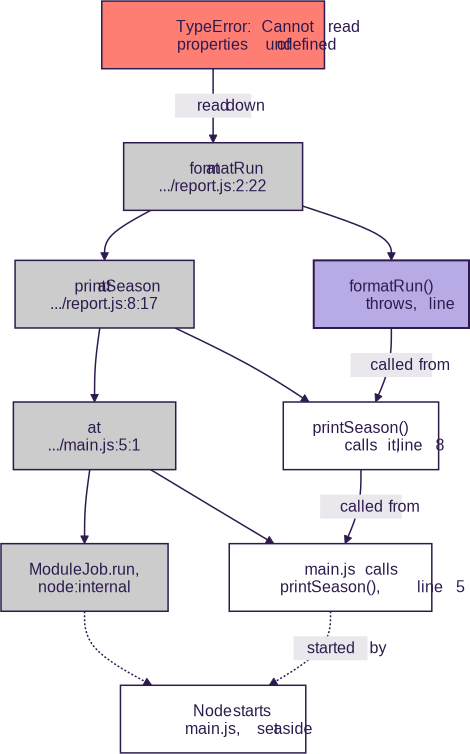
Seeing node:internal can make an error feel too advanced to read, or like a bug in Node.js. It’s neither. Only the frames in your own files, the file:// lines with your season-log path, are yours to change. Set the rest aside, and you’re left with three frames, all in two files you can open in your editor.
To practice that sorting, the next button opens the mentor again. It shows you a stack trace with Node.js’s frames in it and asks you which lines are yours.
Check Your Reading
Ruth wants to see her newest run on its own, so she writes a quick script, newest.js. She has six runs and asks for the sixth:
newest.js
import { loadRuns } from "./load.js";
import { formatRun } from "./report.js";

const runs = loadRuns("runs.json");
console.log(formatRun(runs[6]));
The script stops with an error report as soon as you run it:
$ node newest.js
file:///Users/you/season-log/report.js:2
  const who = `${run.runner} (${run.date})`;
                     ^

TypeError: Cannot read properties of undefined (reading 'runner')
    at formatRun (file:///Users/you/season-log/report.js:2:22)
    at file:///Users/you/season-log/newest.js:5:13
    at ModuleJob.run (node:internal/modules/esm/module_job:569:25)
    at async node:internal/modules/esm/loader:650:26
    at async asyncRunEntryPointWithESMLoader (node:internal/modules/run_main:105:5)

Node.js v26.13.1
Read this report from the top, then answer these questions:
- What’s the error’s name, and what does its message mean in plain words?
- Which function threw it, in which file, and on which line?
- Which call led there, and why is there no
printSeason()line this time? - Which lines of the report point at code Ruth could change?
- It’s a
TypeError. JavaScript tried to read.runnerfrom a value that wasundefined. That value isrun, the one to the left of.runner, soformatRun()was given no run.runneritself isn’t the problem. formatRun()threw it, inreport.js, on line 2:at formatRun (file:///Users/you/season-log/report.js:2:22).- The call came from line 5 of
newest.js, at its top level.newest.jscallsformatRun()directly, so noprintSeason()frame sits between them. Theatlines list only the calls that were in progress. - The two
file://lines with theseason-logpath point to code Ruth could change inreport.jsandnewest.js. TheModuleJob.runandnode:internallines are Node.js loading and starting the module.
You’ve read the season log’s crash in full: a TypeError because run was undefined, thrown in formatRun() in report.js, called from printSeason(), which was called from main.js, with Node.js’s own frames set aside. Now that you know where it crashed, the next question is where to fix it. In the next lesson, Follow the Bad Value Back, you’ll trace that undefined run back to the line that produced it.
