
So far, you’ve written every line of your scripts and run them yourself in VS Code. You created names with let, updated a score from its current value, and used console.log() to see what happened.
In the next lesson, you’ll practice in a different place: an on-site coding exercise that runs right here in your browser. The platform gives your code values to work with and checks the answer it produces. This lesson walks you through that agreement so the starter code won’t feel like a wall of unfamiliar symbols.
The Starter Code Is a Function the Platform Runs
Say you’re hosting a game night and need to know how many chairs to put out. An exercise about that might give you this code, shown here with your line already filled in:
export function chairsNeeded(guests, hosts) {
  let chairs = guests + hosts;
  return chairs;
}
These four lines define a function: a named piece of code that doesn’t run until something calls it by name. You’ll write your own functions in a later course. For now, you only need to know which lines are supplied and which is yours:
- Line 1 is supplied. It names the function
chairsNeededand lists its two inputs in parentheses,guestsandhosts. Each input is a parameter, a name that gets its value from whoever calls the function. Theexportat the start is how the platform finds your function, so keep this line as it is. - Line 2 is yours. It’s a
letline like the ones you’ve written before, and it works out the answer from the inputs. - Line 3 is supplied too. It hands the answer back, as you’ll see in a moment.
- Line 4, the closing brace, is supplied and ends the function.
In an exercise, your line starts as a TODO placeholder, and running the tests before you replace it tells you the function isn’t finished yet.
Different Calls Bring Different Values
Line 2 never says how many guests there are. The parameters get their values only when the function is called, and each call can bring different ones. Here’s the same function with two calls added. Before you read the output, work out how many chairs each call should give:
export function chairsNeeded(guests, hosts) {
  let chairs = guests + hosts;
  return chairs;
}

console.log(chairsNeeded(4, 1));
console.log(chairsNeeded(7, 2));
5
9
In the first call, guests is 4 and hosts is 1, so chairs points at 5. The second call runs the same lines with 7 and 2, so one line of yours handles every game night.
In an exercise, you won’t write those calls. The platform makes them, often with values you never see, and checks what comes back each time. Here’s how the pieces connect:
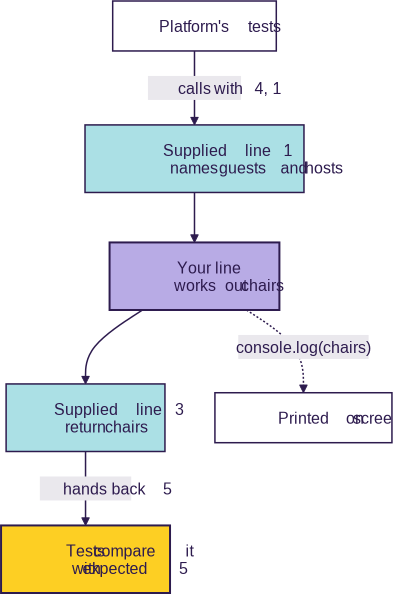
return Hands the Answer Back, but console.log() Doesn’t
The keyword return on line 3 passes the value of chairs back to whoever called the function. That’s the only way your answer reaches the tests. Since console.log() is how you’ve checked results so far, here’s what happens if you use it instead:
function chairsNeeded(guests, hosts) {
  let chairs = guests + hosts;
  console.log(chairs);
}

console.log(chairsNeeded(4, 1));
5
undefined
Whoops! The 5 appears on screen, printed from inside the function. But the call itself gives back undefined, JavaScript’s way of saying that no value came back. Printing shows a value to you, while returning hands it to the code that called the function.
You can still use console.log() in an exercise to peek at a value while you work, as long as you keep the return line.
Run the Tests, Read the Feedback, Try Again
When you click Run Tests, the platform calls your function and compares what it returns with an expected value worked out from the task. Four guests and one host need five chairs, so a test that calls chairsNeeded(4, 1) expects 5. A green test means your returned value matched. A red one shows a message, usually with your returned value next to the expected one.
Sometimes a red test isn’t about a wrong answer. Say you typed host instead of hosts on line 2. JavaScript can’t run that line, so every test shows the same error instead of two values to compare: JavaScript couldn’t find anything called host, much like the ReferenceError you fixed in your own script. Compare that name letter by letter with the inputs on line 1 and fix it.
A red test is a clue, not a verdict. Read its message, change one thing, and run the tests again. Run them early and often, even before you think you’re done. If you’d like more room, use the Full screen button, or press T while you’re not typing in the editor.
Before you move on, check your understanding of the contract with one more call. If the platform calls chairsNeeded(10, 3), what does the test expect, and which line hands that value back? If you said 13 and line 3, then you’re ready.
In the next lesson, you’ll put this into practice and keep a running score in your first on-site exercise.
