
In the last lesson, const nextWeek = lastWeek; gave one array two names, so splicing Friday out of next week took it out of last week too. The fix was lastWeek.slice(), which builds a new array with its own arrow. However, each slot of that new array still holds a day record, and the Okafors’ tweaks don’t stop at removing days. They change what’s inside the days, too.
In this lesson, you’ll copy the plan with a second piece of syntax, change one day’s dinner, and find out exactly what the copy shares with the original. You’ll be able to trace which name sees which change and to write a copy that leaves last week as it was. Start with another way to write the copy you already have.
Copy the Week With Spread
The .slice() call works, but JavaScript code often copies an array with a shorter form called spread syntax. Inside square brackets, three dots in front of an array unpack its items, one by one, into a new array. So [...lastWeek] is a new array with the same items in the same order, matching what lastWeek.slice() gives you.
Open plan.js and change the line that makes next week so it uses spread instead of .slice():
plan.js
const lastWeek = [
  { day: "Monday", cook: "Ngozi", meals: ["leftover rice", "jollof rice"] },
  { day: "Tuesday", cook: "Chidi", meals: ["egg sandwiches", "pepper soup"] },
  { day: "Wednesday", cook: "Ada", meals: ["pepper soup", "spaghetti and meatballs"] },
  { day: "Thursday", cook: "Emeka", meals: ["salad wraps", "bean tacos"] },
  { day: "Friday", cook: "Chidi", meals: ["bean tacos", "takeout pizza"] },
  { day: "Saturday", cook: "Ada", meals: ["pancakes", "veggie stir-fry"] },
  { day: "Sunday", cook: "Grandma Ifeoma", meals: ["moi moi", "chicken curry"] },
];

const nextWeek = [...lastWeek];
nextWeek.splice(4, 1);

console.log("Next week:", nextWeek.length, "days");
console.log("Last week:", lastWeek.length, "days");
Run it, and only next week loses its takeout night:
$ node plan.js
Next week: 6 days
Last week: 7 days
Spread and .slice() with no arguments make the same copy, so use whichever reads better to you. Spread can do more than copy arrays, and you’ll meet more of it later. That’s all you need to know about it for now.
With Friday gone, Chidi wants to try the family’s new recipe, egusi soup, as Tuesday’s dinner instead of pepper soup. Tuesday sits at position 1 in next week, and its dinner is the second item in its meals array. Add one line after the splice, and log Tuesday’s meals from both weeks:
plan.js
const lastWeek = [
  { day: "Monday", cook: "Ngozi", meals: ["leftover rice", "jollof rice"] },
  { day: "Tuesday", cook: "Chidi", meals: ["egg sandwiches", "pepper soup"] },
  { day: "Wednesday", cook: "Ada", meals: ["pepper soup", "spaghetti and meatballs"] },
  { day: "Thursday", cook: "Emeka", meals: ["salad wraps", "bean tacos"] },
  { day: "Friday", cook: "Chidi", meals: ["bean tacos", "takeout pizza"] },
  { day: "Saturday", cook: "Ada", meals: ["pancakes", "veggie stir-fry"] },
  { day: "Sunday", cook: "Grandma Ifeoma", meals: ["moi moi", "chicken curry"] },
];

const nextWeek = [...lastWeek];
nextWeek.splice(4, 1);
nextWeek[1].meals[1] = "egusi soup";

console.log("Next Tuesday:", nextWeek[1].meals);
console.log("Last Tuesday:", lastWeek[1].meals);
Before you run it, decide what the last line prints. Next week is a copy now, so does last Tuesday still have pepper soup for dinner? Run node plan.js, then open the box to compare:
$ node plan.js
Next Tuesday: [ 'egg sandwiches', 'egusi soup' ]
Last Tuesday: [ 'egg sandwiches', 'egusi soup' ]
Last Tuesday has egusi soup, too. The line that made the change names only nextWeek, and the copy kept Friday’s splice to itself a moment ago. Yet this time, last week changed along with it.
See What the Copy Shares
The copy protected last week from one change but not from the other, and the reason is in what each slot of the array holds. Redraw the picture from the last lesson, and this time draw what’s inside the slots:
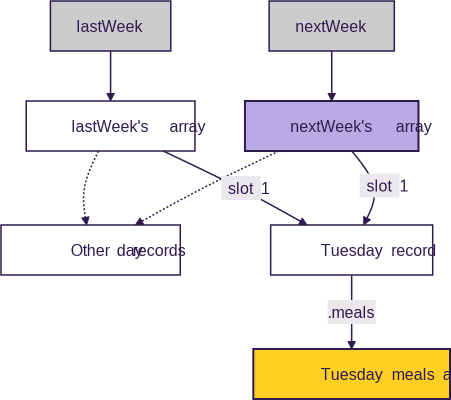
A slot doesn’t hold the day record itself. It holds an arrow to the record, the same kind of arrow a name has. So [...lastWeek] built a new array with seven new slots and filled them with copies of last week’s seven arrows. The records at the ends of those arrows weren’t copied. Slot 1 of nextWeek and slot 1 of lastWeek both point at the one Tuesday record, and its meals property points at the one Tuesday meals array.
Now trace the two changes along the arrows. The call nextWeek.splice(4, 1) follows the arrow in nextWeek to the new array and removes a slot from it. Last week’s array is a different array, so it keeps all seven slots. The Friday record itself didn’t change. Next week only stopped pointing at it.
The line nextWeek[1].meals[1] = "egusi soup"; follows three arrows: from nextWeek to its array, from slot 1 to the Tuesday record, and from .meals to Tuesday’s meals array. Then it changes that array. Last week’s slot 1 reaches the same array, so last week sees egusi soup too.
A copy like this, which builds a new array at the top level only and shares everything below it, is a shallow copy. Both [...lastWeek] and lastWeek.slice() make one. The rule from the last lesson—copy the array and not the arrow—still holds one level down. The shallow copy gave next week a new array, but inside that array it copied only the arrows.
If the three arrows in nextWeek[1].meals[1] = "egusi soup"; still feel slippery, the button below opens a chat with your mentor, with this question ready to send. Expect it to check your explanation and push back where it’s off:
Copy Each Day You Change
Next week’s tweaks change meal lists, so next week needs more than a new outer array. It needs its own day records and its own meals arrays, too. The general rule is to copy every level you intend to change.
Objects have spread syntax as well. Inside curly braces, { ...day } copies a record’s properties into a new object. However, that’s a shallow copy too, so the meals property of the new record points at the same meals array as the original record. After the spread, you write the meals property again, as meals: [...day.meals]. A property that comes after the spread replaces the one the spread copied, and this one holds a new array.
To copy every day, pass a callback that makes that copy to .map(), which calls its callback once for each day and collects what it returns in a new array. Replace the line that makes next week with the .map() call:
plan.js
const lastWeek = [
  { day: "Monday", cook: "Ngozi", meals: ["leftover rice", "jollof rice"] },
  { day: "Tuesday", cook: "Chidi", meals: ["egg sandwiches", "pepper soup"] },
  { day: "Wednesday", cook: "Ada", meals: ["pepper soup", "spaghetti and meatballs"] },
  { day: "Thursday", cook: "Emeka", meals: ["salad wraps", "bean tacos"] },
  { day: "Friday", cook: "Chidi", meals: ["bean tacos", "takeout pizza"] },
  { day: "Saturday", cook: "Ada", meals: ["pancakes", "veggie stir-fry"] },
  { day: "Sunday", cook: "Grandma Ifeoma", meals: ["moi moi", "chicken curry"] },
];

const nextWeek = lastWeek.map((day) => ({ ...day, meals: [...day.meals] }));
nextWeek.splice(4, 1);
nextWeek[1].meals[1] = "egusi soup";

console.log("Next Tuesday:", nextWeek[1].meals);
console.log("Last Tuesday:", lastWeek[1].meals);
The arrow function needs the parentheses around the object. Without them, JavaScript reads the opening curly brace as the start of the function’s body instead of an object to return.
Run the script, and only next Tuesday has egusi soup:
$ node plan.js
Next Tuesday: [ 'egg sandwiches', 'egusi soup' ]
Last Tuesday: [ 'egg sandwiches', 'pepper soup' ]
Now each level that the tweaks change is new. The .map() call builds a new outer array, the spread builds a new record for each day, and [...day.meals] builds a new meals array inside it. The new records hold the same string values for day and cook. They can share those strings because a string can’t be changed in place. Giving next Tuesday a different cook assigns a new string to the copy’s cook property, which changes only that record.
To see that copy one step at a time, ask your mentor for a walkthrough of a single day:
This copy works because the plan is an array of records that each hold one array. Data nested more deeply needs a copy at every level you change. Node.js and browsers also have a built-in function that copies every level of plain data at once, creating a deep copy, which you’ll explore later. That’s all you need to know about deep copies for now.
Check Your Understanding
Emeka offers to cook on Saturday, and Chidi wants to take over Sunday. Ada tries the swap on a copy of last week’s weekend:
weekend.js
const lastWeek = [
  { day: "Monday", cook: "Ngozi", meals: ["leftover rice", "jollof rice"] },
  { day: "Tuesday", cook: "Chidi", meals: ["egg sandwiches", "pepper soup"] },
  { day: "Wednesday", cook: "Ada", meals: ["pepper soup", "spaghetti and meatballs"] },
  { day: "Thursday", cook: "Emeka", meals: ["salad wraps", "bean tacos"] },
  { day: "Friday", cook: "Chidi", meals: ["bean tacos", "takeout pizza"] },
  { day: "Saturday", cook: "Ada", meals: ["pancakes", "veggie stir-fry"] },
  { day: "Sunday", cook: "Grandma Ifeoma", meals: ["moi moi", "chicken curry"] },
];

const weekend = lastWeek.slice(5);
weekend[0].cook = "Emeka";
weekend[1] = { day: "Sunday", cook: "Chidi", meals: ["moi moi", "bean tacos"] };

console.log("Last Saturday:", lastWeek[5].cook);
console.log("Last Sunday:", lastWeek[6].cook);
Run it, and last week’s Saturday has a new cook, while its Sunday doesn’t:
$ node weekend.js
Last Saturday: Emeka
Last Sunday: Grandma Ifeoma
Work through these with the output in front of you:
- Draw the names and arrows for
lastWeekandweekendafter the two changes. Use your drawing to explain why the two days behave differently. - Change only the line that makes
weekendso that last week’s Saturday keeps Ada as its cook. Then run the script again to check.
For the first task, weekend is a new array with two slots, holding copies of the arrows to the Saturday and Sunday records. The line weekend[0].cook = "Emeka"; follows slot 0 to the shared Saturday record and changes it, so last week sees Emeka. The line weekend[1] = { ... }; doesn’t change a record. It points slot 1 of weekend at a new record, and last week’s slot 6 still points at Grandma Ifeoma’s Sunday.
For the second, copy each day as well as the array:
const weekend = lastWeek.slice(5).map((day) => ({ ...day }));
Saturday’s edit changes only cook, and Sunday’s edit replaces the whole record, so the meals arrays can stay shared. Copy every level you intend to change.
You can now follow the arrows to see what a shallow copy shares, and copy each level of the plan that next week changes. So far, every change has happened in the script’s top-level code. In the next lesson, Change a Caller’s Data on Purpose, you’ll see what happens when a function receives the plan and changes it.
