
Every program you’ve written so far runs from top to bottom, one line after another. That works well until you need the same few lines in three places. You copy them, and changing the wording means fixing every copy. Functions solve that: you write the lines once, name them, and run them by that name whenever you need them.
In this course, you’ll write your own functions, hand them values, get answers back, and combine them into small programs. By the end, you’ll build a tiny arcade score toolkit that calculates scores, picks a rank, and makes a message for each player. This first lesson covers the two moves that everything else rests on: writing a function and calling it.
As in earlier courses, open your course folder in VS Code with the integrated terminal open there. You’ll type the examples into small files in scratch/ and run them with node. Before each run, take a moment to predict what will appear. Your prediction is what turns a run into feedback.
From Filling In Functions to Writing Them
If you’ve worked through the earlier JavaScript Basics courses, then you’ve already met functions without writing one from scratch. Some exercises gave you a wrapper like the one below, and you filled in the decisions inside it:
function ticketPrice(age) {
  if (age < 12) {
    return 6;
  } else if (age >= 65) {
    return 7;
  } else {
    return 10;
  }
}
Take a quick look and decide which price a 70-year-old visitor pays. The runner called this function with an age, such as 70, and that value arrived in age. The first condition is false, and the second is true, so the function answers 7. The return lines handed that answer back to the runner. The video after your first exercise, Return a Value or Log a Message?, teaches you to write them.
Back then, the exercises supplied the first line, including the function’s name and age, and the closing brace. In this course, you write those parts too.
If you’re starting with this course, welcome! You should already be able to run a script with node from the VS Code terminal, store values in variables, and choose between options with if and else. Filling in a supplied wrapper like the one above also helps.
If those still feel new, work through the earlier JavaScript Basics courses first, since this course builds on them.
Spot the Repeated Code
Picture a game night at a small arcade. Before each round, a short announcement calls the next player to the machine. For two players, you need four lines:
scratch/announce.js
console.log("Next up: Ada!");
console.log("Grab a controller, Ada.");
console.log("Next up: Grace!");
console.log("Grab a controller, Grace.");
The two pairs differ only in the name. With ten players, you’d have twenty lines, and changing “Grab a controller” to “Grab a joystick” would mean ten edits. A function lets you write the announcement once and fill in the part that changes.
Write a Function Declaration
Replace the contents of scratch/announce.js with this function:
scratch/announce.js
// Announce the next player in two lines
function announcePlayer(name) {
  console.log(`Next up: ${name}!`);
  console.log(`Grab a controller, ${name}.`);
}
This is a function declaration. It has four parts:
- The keyword
functionsays that you’re declaring a function. - The name
announcePlayeris how you’ll run it later. Function names usually start with a verb. Like variable names, they use camelCase. - The parameter
name, inside the parentheses, is a placeholder for the value that changes. A parameter works like a variable that gets its value each time the function runs. - The body between the curly braces holds the lines that run.
The strings use backticks, which let ${name} drop the value of name into the text. The // comment above the function says what it does, a good habit for every function.
Before you run this file, predict what it prints. Then save it and run it:
$ node scratch/announce.js
Nothing appears at all. That’s correct! A declaration describes what the function does, but it doesn’t run the body. Like a recipe card, it cooks nothing until someone follows it.
Call the Function
To run the body, you call the function. A call is the function’s name followed by parentheses, with the value for the parameter inside. That value is an argument. Add two calls below the declaration:
scratch/announce.js
// Announce the next player in two lines
function announcePlayer(name) {
  console.log(`Next up: ${name}!`);
  console.log(`Grab a controller, ${name}.`);
}

announcePlayer("Ada");
announcePlayer("Grace");
Each call should print two lines, so predict four before running the file again:
$ node scratch/announce.js
Next up: Ada!
Grab a controller, Ada.
Next up: Grace!
Grab a controller, Grace.
The output matches your original four lines, but the announcement now lives in one place. Change “controller” to “joystick” in the body, run the file again, and both players get the new wording.
At each call, JavaScript jumps into the body with name set to the argument, runs the body’s lines in order, and then jumps back to the line after the call. During the first call, name is "Ada". During the second, it’s "Grace". The same body runs twice with a different value each time.
As a rule of thumb, declare a function near the top of your file, above the code that calls it, so you first read what the function does and then when it runs.
Trace Calls Between Other Lines
Calls can sit between other lines. This new file, scratch/cheer.js, mixes ordinary console.log() lines with three calls:
scratch/cheer.js
function cheer(name) {
  console.log(`Go, ${name}!`);
}

console.log("Round one");
cheer("Ada");
console.log("Round two");
cheer("Grace");
cheer("Ada");
Before you run it, write down two things on paper or in a comment. First, list every line it prints, in order. Second, note the value of name during each of the three calls. Then run it and compare:
$ node scratch/cheer.js
Round one
Go, Ada!
Round two
Go, Grace!
Go, Ada!
The declaration printed nothing. Then the program ran line by line, each call jumping into the body and back. So name was "Ada", then "Grace", then "Ada" again. If your list matched, you can now trace a program that declares and calls functions.
For more tracing practice, try the optional mentor button below. It opens a mentor chat with a question typed in for you to send. The mentor writes a short program, you reply with the lines you expect, and the mentor explains where your answer matches and why. If you’d rather practice on your own, change the order of the calls in cheer.js, predict the output, and run the file again.
Pass More Than One Argument
A function can have more than one parameter. Separate the parameters in the declaration and the arguments in the call with commas. This one announces a player’s score:
scratch/score.js
function announceScore(name, points) {
  console.log(`${name} scored ${points} points!`);
}

announceScore("Ada", 120);
announceScore("Grace", 95);
Running it shows one line per call:
$ node scratch/score.js
Ada scored 120 points!
Grace scored 95 points!
JavaScript matches arguments to parameters by position. The first argument goes into the first parameter, the second into the second. In the first call, name is "Ada" and points is 120.
Only position counts, even when your variables share the parameters’ names. Replace the contents of scratch/score.js with these lines, and predict the output before running the file:
scratch/score.js
function announceScore(name, points) {
  console.log(`${name} scored ${points} points!`);
}

const points = 150;
const name = "Linus";
announceScore(points, name);
The call passes points first, so its value lands in the first parameter:
$ node scratch/score.js
150 scored Linus points!
The message reads backward, even though the names look like a perfect fit.
The outside points and name don’t connect to the same-named parameters. Picture two columns, with the call’s arguments on the left and the parameters on the right. Lines connect each argument to the parameter in the same position. The variable names in the call never cross over into the function, only their values do:
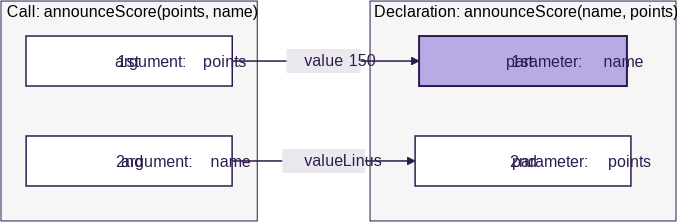
To fix the output, put the arguments in the order the parameters expect. Values typed straight into the call work too, no variables needed:
scratch/score.js
function announceScore(name, points) {
  console.log(`${name} scored ${points} points!`);
}

const points = 150;
const name = "Linus";
announceScore(name, points);
announceScore("Mika", 80);
Now both lines read correctly:
$ node scratch/score.js
Linus scored 150 points!
Mika scored 80 points!
So when you call a function, check the order of its parameters in the declaration, not the names of your variables.
Two more details before you practice. If you leave out the parentheses and write only announceScore, nothing runs, because only the parentheses call the function. And if you pass fewer arguments than there are parameters, each parameter without an argument gets the value undefined, so a message might read Ada scored undefined points!.
Turn Repeated Code Into a Function
Now it’s your turn to write a function from scratch. The snack counter at the arcade logs each order like this:
scratch/snacks.js
console.log("Ada orders popcorn.");
console.log("Enjoy your popcorn, Ada!");
console.log("Grace orders nachos.");
console.log("Enjoy your nachos, Grace!");
Create scratch/snacks.js and write a function named orderSnack() that logs an order and a reply for any person and any snack. Decide which parts change between orders, because those become your parameters. Then call your function three times, twice to reproduce the four lines above and once with your own name and favorite snack. Run the file and check that the first four lines match the originals exactly.
Once your version works, compare it with this solution:
scratch/snacks.js
// Log a snack order and a friendly reply
function orderSnack(name, snack) {
  console.log(`${name} orders ${snack}.`);
  console.log(`Enjoy your ${snack}, ${name}!`);
}

orderSnack("Ada", "popcorn");
orderSnack("Grace", "nachos");
orderSnack("Sam", "pretzels");
The calls produce six lines, two per order:
$ node scratch/snacks.js
Ada orders popcorn.
Enjoy your popcorn, Ada!
Grace orders nachos.
Enjoy your nachos, Grace!
Sam orders pretzels.
Enjoy your pretzels, Sam!
Your parameter names might differ, and that’s fine. What matters is that your function has parameters for the two values that change between orders and that each call passes its arguments in the same order as the parameters.
Next, you’ll practice this on-site in the exercise Fill In Function Bodies. The declaration lines are supplied there, and you write the bodies.
On-site, you write and run code in your browser, with no file to save. Click Run Tests to check your work: the tests call your functions with different arguments. When one fails, read its message, compare what it expected with what your code displayed, change one thing, and rerun. Run them early and often, and read any error message for clues. For more room, use the Full screen button.
