As the old joke goes, Java is to JavaScript as car is to carpet. They’re two separate programming languages that happen to share a name, and the Java vs JavaScript tangle started with a 1995 marketing deal between Netscape and Sun, Java’s maker.
JavaScript runs inside web pages and makes them respond to you: the menu that opens when you click, the map you can drag, the heart that turns red when you like a post. Java mostly works behind the scenes on servers and Android phones. (It’s probably in your wallet, too, on the chip in your bank card.)
The right first language depends on what you want to build:
- JavaScript if you want to build websites or see results fast. Every major browser already runs it.
- Java if you’re headed for big backend systems, or your school or job uses it.
Free Bonus: JavaScript Cheat Sheet

Variables, arrays, objects, functions, and async basics in one printable reference.
Get the Free Cheat Sheet »How a Marketing Deal Gave Two Languages One Name
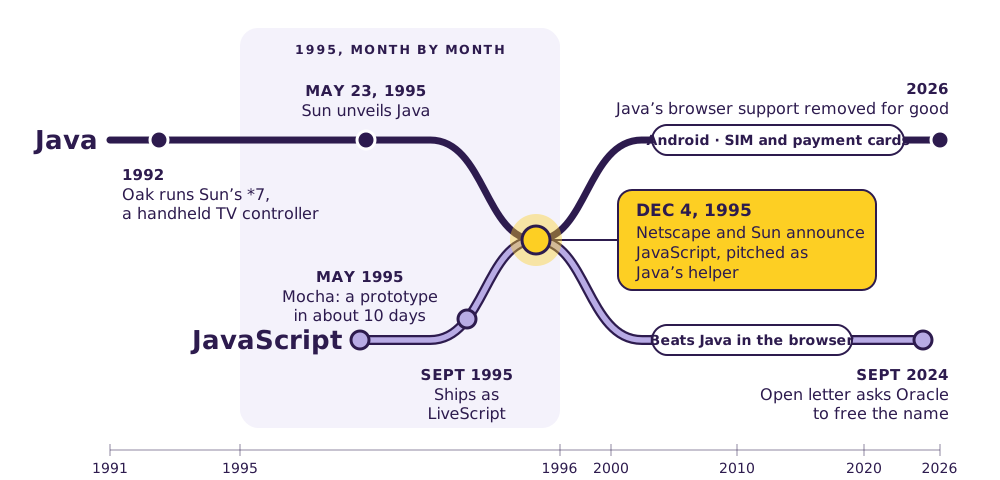
Sun Microsystems spent early 1995 running what a history of JavaScript cowritten by its creator, Brendan Eich, calls a “guerrilla marketing campaign” for Java, a language it hadn’t even released yet.
Java also had a showstopper demo. At a conference that year, its creator, James Gosling, made a 3D molecule on a web page turn as he moved his mouse. “The entire audience went ‘Aaaaaaah!’” Gosling recalled in Sun’s history of Java. Until then, they’d only seen still pictures in a browser.
Sun unveiled Java on May 23, 1995. Around 4 a.m. that morning, Netscape co-founder Marc Andreessen agreed to build Java into Netscape’s browser, and he revealed the deal on stage at Sun’s keynote. Inside Netscape, he had a rallying cry:
“Netscape plus Java kills Windows.”
Java was a language for programmers. For everyone else, Andreessen wanted a second language where “anyone could write a few lines directly within an HTML document,” meaning right inside a web page.
Java wasn’t built for that.
Eich had joined Netscape with the promise that he could put Scheme, a small research language, in the browser. Then, in Eich’s words, “the diktat from upper engineering management was that the language must ‘look like Java.’”
That order is why they share curly braces and semicolons. Underneath, Eich borrowed from Scheme and other languages, so they’re strangers who happen to dress alike.
Eich built the first version in ten days that May, the same month Java went public. Andreessen code-named it Mocha, hoping, according to Eich, that it would be renamed JavaScript later. It first shipped as LiveScript, in a test version of Netscape’s browser that September. On December 4, 1995, Netscape and Sun announced it as JavaScript.
Their joint press release cast the two languages as partners. Java was “used by programmers” to build applets, small programs that ran inside a web page. JavaScript was for “HTML page authors” and could be used “by people with little or no programming experience.” It could even steer a Java applet on the same page.
Eich later summed up how that partnership ended:
“JS beat Java on the client.”
The client is the browser on your own computer, as opposed to the servers that send it web pages. Browsers dropped applets over the years, and in 2026, Java 26 removed applet support from Java itself.
Java didn’t start on the web, either. In 1992, Sun’s secret Green Team showed off *7, pronounced “star seven,” a handheld touchscreen remote for home entertainment gear. Gosling wrote a language for it and named it Oak, after the tree outside his window. Sun later renamed it Java and aimed it at the web, a fit Gosling called “just an incredible accident.”
Here’s how the two stories run side by side:
Who Owns the Name “JavaScript”?
The 1995 deal left a paper trail. Sun applied for a trademark on the name “JavaScript” on December 1, 1995, three days before the joint announcement. A trademark is a legal claim to a brand name.
The U.S. trademark record shows that the registration came through in 2000. Netscape never owned the name. It only had a license from Sun to use it.
That mattered when the language needed an official rulebook, called a standard, so that every browser would run it the same way. Ecma, a standards organization, took on the job in 1996. According to the history of JavaScript, Sun refused to license the name “JavaScript” to Ecma, and Netscape wouldn’t hand over “LiveScript” either.
With both names refused, Ecma kept ECMAScript, the placeholder name it had used all along. Eich wasn’t a fan. In a 2006 mailing-list post, he wrote:
“ECMAScript was always an unwanted trade name that sounds like a skin disease.”
The official standard still carries that name, and its latest edition, ECMAScript 2026, came out in June 2026.
Microsoft added a third name. It built its own version of the language for Internet Explorer and shipped it in 1996 as JScript. For a while, one language went by JavaScript, JScript, and ECMAScript.
In 2009, Oracle agreed to buy Sun. Oracle called Java “the most important software Oracle has ever acquired.” The JavaScript trademark came along with the company, and Oracle still owns it.
Many developers think the name should belong to everyone. On September 16, 2024, the founder of Deno, a program that runs JavaScript outside the browser, published an open letter asking Oracle to give up the trademark. Tens of thousands of developers have signed it, and the letter names Brendan Eich as a co-signer.
In November 2024, Deno asked the U.S. trademark board to cancel the trademark. One of its arguments is that “JavaScript” has become a generic word that no company can own. As of November 4, 2026, the board’s docket shows no ruling. The case has been suspended since August 28, 2026, while the two sides negotiate a settlement.
The Real Difference Between Java and JavaScript
The names tell you nothing about how the languages behave. The clearest difference shows up when you make a mistake, such as putting text where a number belongs. Every value in a program has a type, like a number or a piece of text. Java checks most of those types before the program runs. JavaScript waits until the program runs, and even then it lets some mistakes slide.
Here’s a short Java program that tries to store the word “ten” in a variable meant for whole numbers:
TypeError.java
public class TypeError {
    public static void main(String[] args) {
        int age = "ten";
        System.out.println(age + 1);
    }
}
Java’s compiler is the tool that turns your code into a program the computer can run. It refuses to build this one:
$ javac TypeError.java
TypeError.java:3: error: incompatible types: String cannot be converted to int
        int age = "ten";
                  ^
1 error
You see the error before a single line has run. Nothing gets built until you fix it, so the mistake can’t reach anyone using your program.
The same mistake in JavaScript runs without complaint:
typeerror.js
const age = "ten";
console.log(age + 1);
console.log(age * 2);
Run it, and both lines print a result:
$ node typeerror.js
ten1
NaN
JavaScript turns age + 1 into "ten1", a string, because + glues text together when one side is text. It turns age * 2 into NaN, a special number value that means “not a number.” Neither line is an error, so the bug shows up later, as a wrong value on someone’s screen.
JavaScript does stop on some mistakes, but only when the faulty line runs. So a bug can sit unnoticed until the one input that sets it off comes along.
This is also what to watch for when an AI assistant writes JavaScript for you. Its code usually runs, so look for the silent bugs. One is + on a value that might be text, such as whatever someone typed into a form. TypeScript, which adds type checks to JavaScript, catches many of these before the code runs. The TypeScript cheat sheet shows its syntax on one page.
JavaScript also has quirks that date back to 1995. Ask it what kind of value null is, and it gives the wrong answer:
> typeof null
'object'
null is JavaScript’s way of saying “nothing here,” so it isn’t an object at all. The answer is a bug from JavaScript’s very first version. It’s a leftover from how the original engine stored values in memory, as Axel Rauschmayer explains.
A fix was proposed years later. Eich wrote that it failed by being “too web-incompatible”, because existing websites relied on the old answer, so the bug stays, on purpose.
Where Each Language Runs Today
Here’s how the two languages compare at a glance:
| JavaScript | Java | |
|---|---|---|
| Where it runs | Every major web browser, plus servers | Servers and desktops through the JVM, plus Android |
| When it checks types | While the program runs | Mostly before it runs |
| How you run a file | Run it directly with the node command |
Compile it first with javac, then run it with java |
| Typical first project | A web page | A program that runs in a terminal window |
| Stack Overflow Developer Survey 2026 | 62.0 percent, ranked first | 27.6 percent, ranked seventh |
The JVM, short for Java Virtual Machine, is the program that runs compiled Java code on any operating system. The survey row measures usage, meaning the share of developers who did extensive work in each language over the past year. It doesn’t count job openings.
In the browser. JavaScript started in the browser, and every major browser still runs it without a plugin. Whenever a web page reacts to a click or updates without reloading, JavaScript is usually behind it. Outside the browser, programs such as Node.js, Deno, and Bun run JavaScript on servers, too.
On servers. Java’s main home is the server, the computer that does the work behind a website or an app. You’ll also find it in desktop apps. Many Java server programs use Spring, a popular framework for building web services.
In your wallet. Java also hides in places you wouldn’t expect. A stripped-down version called Java Card runs on SIM cards and bank-card chips. Some passports carry it, too. When Oracle announced Java Card 3.1 in 2019, it said close to six billion Java Card chips were being deployed every year. There’s a fair chance a little Java is sitting in your phone or wallet right now.
On Android. Google built Android’s app platform on Java. Oracle sued over the Java code Google copied, and in 2021, the U.S. Supreme Court ruled in Google’s favor.
Since 2019, Google has called Android development “Kotlin-first,” and it recommends Kotlin for new apps. Java still works there, and Kotlin, a newer language designed to work with Java, can call Java code directly, so Java skills carry over.
In Minecraft. If you play Minecraft, you may have run Java without knowing it. The game comes in two editions, Java and Bedrock, and the Java Edition is written in Java. Every creeper that’s ever blown up your house there was Java code doing its job.
What Comparison Tables Still Get Wrong
Some of the pages that rank for these languages still repeat claims that stopped being true years ago. The GeeksforGeeks comparison, one of the top search results, says Java can run in any browser. It also says JavaScript “is interpreted but not compiled” and “does not support multithreading.” All three claims are out of date.
“Java runs in the browser.” It used to, through applets, the small Java programs that ran inside web pages. Browsers dropped them years ago, and Java 26 removed the last of the applet code from Java itself, as the proposal behind that change explains.
“JavaScript is interpreted but not compiled.” Both languages compile code while it runs. Each one turns the parts of your code that run most often into machine code, the computer’s own instructions. Java does this inside the JVM, and JavaScript does it inside the browser’s engine, such as Chrome’s V8.
The difference you’ll notice is that Java usually adds a step of its own. You compile your code with javac first, and then you run it. JavaScript has no such step.
“JavaScript does not support multithreading.” A thread is one line of work in a program, and multithreading means running several at once. JavaScript does one thing at a time by default, and while it waits for a file or a reply from the network, it gets on with other work. When you need several jobs done at the same time, JavaScript can do that, too, with what Node.js calls worker threads and browsers call web workers.
Java gives you threads directly, and that’s a real strength for big servers. For a first project, though, neither language’s approach to threads will hold you back.
The Same Program in Both Languages
To see how much code each language needs, compare the same small program, a word counter, written in both. It reads a text file, counts the words, and prints the total, the number of different words, and the five most common ones.
Java needed 35 lines for the job, and JavaScript needed 15. You don’t have to follow the code to see that difference. Skim the two listings and compare their length. Here’s the JavaScript version:
wordcount.js
import { readFileSync } from "node:fs";

const path = process.argv[2];
const text = readFileSync(path, "utf8").toLowerCase();
const words = text.match(/[a-z']+/g) ?? [];

const counts = new Map();
for (const word of words) {
  counts.set(word, (counts.get(word) ?? 0) + 1);
}

const top = [...counts.entries()]
  .sort((a, b) => b[1] - a[1] || (a[0] < b[0] ? -1 : 1))
  .slice(0, 5);

console.log(`${words.length} words, ${counts.size} unique`);
for (const [word, count] of top) {
  console.log(`${word}: ${count}`);
}
The Java version is long enough to be a scroll on a phone, so it’s folded up here. Open it to see all 35 lines:
WordCount.java
import java.io.IOException;
import java.nio.file.Files;
import java.nio.file.Path;
import java.util.ArrayList;
import java.util.HashMap;
import java.util.List;
import java.util.Locale;
import java.util.Map;

public class WordCount {
    public static void main(String[] args) throws IOException {
        String text = Files.readString(Path.of(args[0]))
                .toLowerCase(Locale.ROOT);
        String[] words = text.split("[^a-z']+");

        Map<String, Integer> counts = new HashMap<>();
        int total = 0;
        for (String word : words) {
            if (word.isEmpty()) {
                continue;
            }
            counts.merge(word, 1, Integer::sum);
            total++;
        }

        List<Map.Entry<String, Integer>> entries =
                new ArrayList<>(counts.entrySet());
        entries.sort((a, b) -> {
            int byCount = b.getValue() - a.getValue();
            return byCount != 0 ? byCount : a.getKey().compareTo(b.getKey());
        });

        System.out.println(total + " words, " + counts.size() + " unique");
        for (int i = 0; i < Math.min(5, entries.size()); i++) {
            Map.Entry<String, Integer> entry = entries.get(i);
            System.out.println(entry.getKey() + ": " + entry.getValue());
        }
    }
}
Both versions share curly braces and the for keyword, thanks to the “look like Java” order from 1995. The Java version is longer because it spells out its types, such as Map<String, Integer>, and wraps everything in a class. JavaScript has a class keyword too, but a short script doesn’t need one.
Both programs ran on November 4, 2026, with Node 26.13.0 and JDK 25.0.5 on a small cloud server, with each command timed 50 times. Each printed the same five words for a 79-word sample file. The step counts start from a computer with neither language installed and include installing the language, writing the file, and running it:
| Measure | JavaScript | Java |
|---|---|---|
| Non-blank lines | 15 | 35 |
| Steps to the first run | 3 | 4, with a compile step |
| Run time | 37 ms | 58 ms, once compiled |
| Compile time | None | 766 ms |
| Compile and run at once | Not needed | 749 ms |
Java’s compile step added about three-quarters of a second. Once the Java version was compiled, both programs started in well under a tenth of a second. That’s startup time for a tiny job, so it can’t tell you which language is faster on big jobs.
Java vs JavaScript: Which Should You Learn First?
The decision comes down to what you want to build first:
| If you want to… | Learn | Why |
|---|---|---|
| Build your first website | JavaScript | It’s the language browsers run |
| Write the frontend and backend in one language | JavaScript | It runs in the browser and on the server |
| Work on large backend systems with a team | Java | Strict types keep big codebases in order |
| Build Android apps | Kotlin first, then Java | Kotlin is Google’s default for new apps |
| Experiment while you’re still deciding | JavaScript | One command runs your code, with no compile step |
| Match what your course or target employer uses | Java | It’s what you’ll be assessed on |
For most beginners, JavaScript is the better first language. It’s also the most widely used one in the Stack Overflow Developer Survey 2026, at 62.0 percent of respondents.
Whichever you pick, the time isn’t wasted. Loops and functions work much the same way in both, so your second language comes easier than your first.
The Bottom Line
The shared name is a leftover from 1995, and the languages under it went their own ways long ago. If you want to build for the web, start with JavaScript. If your course or employer runs on Java, start there. Either way, remember "ten1": JavaScript lets that kind of mistake through, and Java won’t build until you fix it.
If you choose JavaScript, start with RealJS, which teaches it with a focus on reading and fixing real code.
Frequently Asked Questions
These are the questions people ask most often about the two languages, with short answers:
No. They’re separate languages that only share part of a name. They check for mistakes at different times and run in different places.
Netscape built the language in 1995 and first released it as LiveScript. Java was the most talked-about language in tech that year, and Netscape was partnering with Sun, Java’s maker, so it renamed its language JavaScript. The two companies pitched it as Java’s helper on web pages.
Oracle does. Sun filed for the trademark in 1995, and Oracle got it when it bought Sun. Deno is challenging that before the U.S. trademark office, and on November 4, 2026, the case was still on hold for settlement talks.
No. Applets, the old way to run Java on a web page, are gone from every major browser, and Java 26 deleted what was left of them. In the browser today, that job belongs to JavaScript.
Most beginners should start with JavaScript, because it runs in the browser you already have and needs no compile step. Pick Java if your course or job uses it, or if you’re aiming at large backend systems.