
The reporting functions you wrote in earlier exercises do real work: they count messages by label and pick out the records behind a number. But so far they’ve lived inside an exercise. Close the tab, and the next batch of feedback has nowhere to go.
In this lesson, you’ll give those functions a home of their own: a small project folder on your computer that runs your report on any batch you hand it. You’ll also break it on purpose, so you know how to read the message it shows you.
Open the Project Folder
The project comes as a ready-made folder. You’ll edit one file in it, and the rest is supplied:
Download the ZIP file and unzip it somewhere you’ll find it again, such as your Documents folder. Open starter/feedback-report/. Keep this folder for the whole course; it already includes the later batches. The separate completed/ folder is a worked answer to consult after your attempt. Inside your starter folder, you’ll see this:
feedback-report/
│
├── data/
│   ├── batch-1.js
│   ├── batch-2.js
│   ├── batch-small.js
│   └── batch-3.js
│
├── errors.js
├── style.css
├── display.js
├── index.html
├── loader.js
└── report.js  ← Your file
Next, open the whole feedback-report/ folder in a code editor, a program made for editing code files. If you don’t have one yet, install the free Visual Studio Code. Use File → Open Folder and pick feedback-report/, so you can see every file in the sidebar.
Now double-click index.html in the folder on your computer. It opens in your browser and shows a report for the first batch:
The page shows a batch menu, label counts, and the source records. Start with Batch 1 or Batch 2; the starter has not yet learned to handle the incomplete records in the later batches.
Apart from the code editor, the project needs nothing else installed. And you won’t write any HTML.
Move Your Own Functions In
Open report.js in your editor. It starts with two supplied functions, followed by makeReport(), which calls them:
report.js
 1function countLabel(records, label) {
 2  let count = 0;
 3  for (const record of records) {
 4    if (record.label === label) {
 5      count = count + 1;
 6    }
 7  }
 8  return count;
 9}
10
11function selectLabel(records, label) {
12  const selected = [];
13  for (const record of records) {
14    if (record.label === label) {
15      selected.push(record);
16    }
17  }
18  return selected;
19}
20
21function makeReport(records) {
22  const counts = {
23    bug: countLabel(records, "bug"),
24    billing: countLabel(records, "billing"),
25    praise: countLabel(records, "praise"),
26  };
27  const bugs = selectLabel(records, "bug");
28  return { counts: counts, records: bugs };
29}
You can keep these supplied functions or adapt your checked solutions from the earlier courses. If you arrived here directly, the supplied versions are a working starting point: read them and check the result before changing anything.
This is a new feedback source. Earlier records used topic and sometimes status; these have id, date, text, and label. Labels are "bug", "billing", or "praise"; null will mean waiting for review. There is no status field.
When adapting a selector, change message.topic === topic to record.label === label, using the parameter and loop-variable names in your function. Remove an approved-status check: it cannot work on a record without status. The loop and the return stay the same. Remove export before every function you copy into this local file; the website’s tests need it, but this project’s ordinary script file does not.
Then replace countLabel() and selectLabel() with your versions. They must fit how makeReport() calls them:
- Both functions take the array of records first and the label second.
- The counting function returns a number.
- The selecting function returns an array of the matching source records.
If your functions have different names or take their arguments in a different order, change the calls inside makeReport() to match. If you can’t get your solutions back, keep the supplied versions as a fallback: they do the same job.
Save the file with Ctrl+S, or Cmd+S on macOS, then reload the page. Your functions now produce the report.
Run Your Report on Batch 2
Now for the payoff. Pick Batch 2 in the menu at the top of the page. The report switches to messages your functions have never seen, and you haven’t edited a line. Batch 2 is small enough to check by eye:
data/batch-2.js
const batch2 = [
  {
    id: "M-201",
    date: "2026-04-01",
    text: "I was charged twice this month.",
    label: "billing",
  },
  {
    id: "M-202",
    date: "2026-04-01",
    text: "Search finds nothing if I use an accent.",
    label: "bug",
  },
  {
    id: "M-203",
    date: "2026-04-02",
    text: "Love the new dark mode!",
    label: "praise",
  },
  {
    id: "M-204",
    date: "2026-04-03",
    text: "The export button freezes the page.",
    label: "bug",
  },
  {
    id: "M-205",
    date: "2026-04-03",
    text: "Where can I download my invoice?",
    label: "billing",
  },
  {
    id: "M-206",
    date: "2026-04-04",
    text: "Photos upload sideways on my phone.",
    label: "bug",
  },
];
Count the bug labels yourself and note the IDs of the matching records. Then compare your results with the page: does the bug count match, and are the records listed under it the same ones?
Batch 2 has three bug reports: M-202, M-204, and M-206. The page should show a bug count of 3 and list exactly those three records. If it does, your unchanged functions handled the new records correctly.
See How the Parts Fit Together
Each file has one job. The files in data/ hold the feedback, loader.js and display.js are the supplied machinery, and report.js holds your logic. Here’s how they pass work along when the page opens:
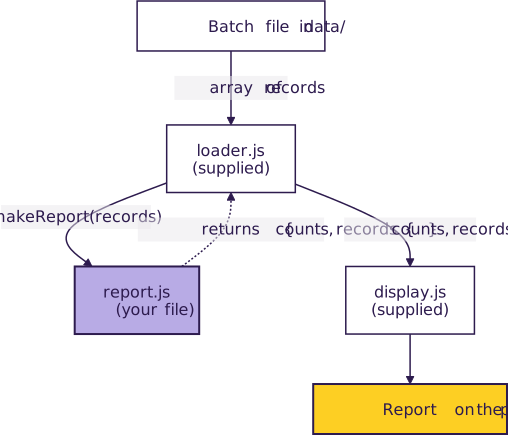
Each batch file holds an array of records written as JavaScript, so the page can read it straight from your folder. The loader takes the array for the batch you picked and calls makeReport() with it. That function returns an object with two properties:
countsholds a number for each label.recordsholds the source records you want to show, here the bug reports.
That object is the whole agreement between your file and the supplied code. The display doesn’t care how you got the numbers. It shows whatever counts and records you hand back.
Read an Error From the Page
Sooner or later you’ll mistype a name, human that you are! It’s better to meet that error on purpose first. In makeReport(), find the line that counts billing messages and misspell the counting function’s name there. Change countLabel to countLable in the billing-count line. Save and reload the page.
Whoops, no report! In its place, the page shows a red error box:
The error panel names countLable and may show the file and line number. Read the name first; exact browser formatting can vary.
Before you change anything, read the message one part at a time:
ReferenceErroris the error’s type. It means JavaScript met a name it doesn’t know.countLable is not definedis the message. It names the word JavaScript got stuck on.- The file and line number, when shown, identify where it got stuck. That’s where you used the name, not where you defined the function. With your own functions pasted in, your line number may differ: check that it points to the line you just changed.
The message tells you where JavaScript got lost, not what to type. You know the counting function is defined near the top of the file under its correct name, so the fix is to correct the spelling on the line the message points to.
Red text doesn’t mean your file is ruined. You don’t need to start over or delete lines until it goes away: fix the one line the message points to, then save and reload.
Fix the spelling, save, and reload. Great, the report is back! Check that the billing count is the same as before, since a page without an error isn’t proof that the numbers are right. If you’re curious, check out what MDN says about this error.
The same message also appears in your browser’s Console, but you don’t need to open the Console here because the page shows the message for you.
Check Yourself
Suppose you rename your selecting function where it’s defined, for example from selectLabel to selectLabels, but you leave its call in makeReport() alone. Before you try it, decide which line the page will point to and what name the message will mention:
The page shows ReferenceError: selectLabel is not defined and points to the line where makeReport() still calls selectLabel(), the selecting call near the bottom of the starter file. The definition line is fine in itself: it defines a function under its new name. JavaScript gets stuck only when the code asks for a name that no longer exists.
Try it to see if you were right, then change the name back. Next, in the exercise Fix a Report Function That Won’t Run, you’ll use what you just practiced on a reporting function with more than one error, fixing them one at a time.
